Register

Unlock 2026: The Great Restack

Learn More
Akeneo-Logo Akeneo-Logo

How to Make Collaboration Flow in Akeneo PIM

Product Experience

How to Make Collaboration Flow in Akeneo PIM

Akeneo PIM has workflow capabilities for product information that enable you and your team to collaborate on work with the usability Akeneo is renowned for, with none of the inflexible rigidity other solutions may present.

We are often asked if Akeneo PIM has workflow capabilities for product information. The answer is a resounding “Yes!” and it enables you and your team to collaborate on work with the usability Akeneo is renowned for, with none of the inflexible rigidity other solutions may present. Here’s how. Early in my career in tech (we’re talking 2000s here), I was often in front of customers demonstrating tools for business process management and enterprise document workflows. Things that looked cool, like drag-and-drop workflow designers and approval logic builders. They demoed really well. Thing is, hardly anyone really used them. Why is that? They were just too rigid and inflexible for the realities of the fast-paced and ever-changing digital workplace. Predefined workflows couldn’t take into account every scenario that would throw up a roadblock (like someone on the team suddenly being hospitalized) without the workflow either becoming overly complex or just too simplified to bother. The exception would be highly-regulated industries like government, finance, and pharmaceutical, where strict accountability is required. Workflow capabilities are absolutely available in Akeneo PIM Enterprise Edition, and they are all about giving you and your team the flexibility to make the work of collecting, enriching, and activating your product record flow. It’s all about gaining visibility into the collaboration that needs to be focused on work that ensures your product story gets to market without delay, and is of the highest quality that your customers expect. Tricked-out workflow design tools that most teams won’t use aren’t required here! Let’s take a look at the neat ways you can have a truly collaborative workflow with Akeneo PIM Enterprise Edition.  

Teamwork Assistant

One reason you might need a “workflow” is to ensure that your team stays on schedule and required work doesn’t get left behind. For example, you have a major launch of a new line of products coming up, and everything must be ready in time for your different channel and marketing teams to promote and sell them on the same day. That means everyone collaborating on those products needs to track progress on enrichment tasks that have been assigned to them, and be notified when there are new tasks for them to take care of. That’s where Teamwork Assistant comes in. Each set of products that needs to be worked on is grouped into a Project, based on their category, channel, and locale. For that Project, a due date is set, and those who have edit permissions for the products selected in the Project will be notified when required attributes need to be completed, based on the attribute groups they have edit permissions on. For example, Mary on the marketing team is responsible for ensuring product descriptions are complete, well-written, and aligned to the brand voice. So she has edit permissions on the Marketing attribute group. If a required Description field for a set of products in the Project isn’t completed, she will be notified repeatedly before the Project’s due date to do so. If everything is good to go with the required attributes that she has edit permissions for, then she won’t be bothered, and will only be notified when everything in the Project is complete. As you would expect, everyone involved can see the overall progress of the Project. And to help everyone be productive and focused, they can even see just the products in the Project they need to work on the Product Grid, just like a View.  
screenshot of Akeneo Workflow
  How is this a different approach than rigid workflow process management? The assignment of the work is made to anyone on the team who has edit permissions for the selected products. So it doesn’t matter if Mary or her teammate Joseph completes the work, as long as it gets done. If Mary were to decide she wanted to escape to a remote island for a few weeks, the work doesn’t stop. Joseph can see what the progress of enrichment is, and pick things up without breaking the flow and without missing the critical deadline that was set.  

Proposals and Approvals

We often see bad product experiences everywhere. “Product description to come when Peter gets back to me with the details” is not something anyone wants to see when researching a product. This is another reason you might need a “workflow”: when collaborating as a team on the product record, you must ensure information doesn’t get out into the wild that hasn’t been checked and approved by a manager first. Akeneo PIM to the rescue here! Akeneo PIM Enterprise Edition provides granular and flexible permissions settings according to your business needs. I won’t go into detail on all of them here, but some that matter for proposal submissions and approving them are the permissions that can be set for a category in your product catalog. These permit user groups to either own products within the category, edit them, view them, or have no permissions at all.  Someone who can edit a product in a category, but does not own the category it’s in, will be able to edit a draft of the product information and then “Send for Approval” – individually, sequentially, or as part of a Bulk Action. The product(s) status will change accordingly, and the users that are part of the group that owns the category will be notified that they have proposals sent for their approval. They can view those in a single place from the Proposals menu under Activities, for a specific product in the Product Edit Form, or by creating a custom View that includes the Draft Status filter. Whatever suits your style of working the best! Whether the manager approves or rejects the proposal(s), the product(s) status will change accordingly: “Working Copy” ready to be published, “Waiting for Approval” or if the proposal doesn’t pass muster, back to “In Progress” it goes.  
Proposal approved workflow screenshot
  Notice some of that Akeneo usability and flexibility in the way Approvals work; the permissions are assigned to a group of users, so anyone within them can work as required to get the job done. Mistakes are minimized if not eliminated, and the workflow doesn’t stop because someone forgot to approve things. There’s more details to Proposals and Approvals, so check out the Akeneo Help Center to find out more.  

Making Work Flow

Why am I writing about all this for product information management for commerce businesses like yours? We are asked if Akeneo PIM Enterprise Edition has workflow capabilities. As you can now see, the answer is “Yes, we do! And you’re going to love how it works, and how it lets you get work done!” Ready to experience some of that workflow flexibility for yourself? Get in touch with us, and we would be happy to discuss how you can collaborate more effectively, without the rigidity.

Ali Hanyaloglu, Sr. Director, Product Marketing

Akeneo

Product Cloud, Product Activation, Product Experience; Oh My!

Product Experience

Product Cloud, Product Activation, Product Experience; Oh My!

Providing top customer experiences requires a Product Activation strategy that enables omnichannel product experiences and supports composable technology.

At Unlock Boston 2022, we proudly introduced to the world Akeneo Product Cloud, our solution for how omnichannel businesses can activate their entire product story across any and all channels that their customers are on, whether owned or unowned, known or yet to be discovered. It’s an exciting vision that will bring Product Experience (or PX) to the same level of importance and business impact as Customer Experience (CX) has been for the last several years. During our introduction of Akeneo Product Cloud we also introduced the concept of Product Activation. In short, Product Activation is a strategy that removes the silos of people, technology, and data that exist within omnichannel businesses and that lead to poor product experiences across any one or more channels. By removing those silos, all the teams who manage each of the different channels where the product record is activated – D2C owned sites, marketplaces, retail network, marketing channels and beyond – are enabled to tell a consistent, complete, and compelling story whether they own the channel experience or not. A successful Product Activation strategy is made up of four essential parts:
  1. The first step is managing all the information about a product. Not just the title, description, size, color, and so on, but also all the dynamic data that buyers are looking for, such as reviews, sourcing, pricing, availability, and so on.
  2. You then need to connect all the data that is managed with different tools by different people, so that a single product record can be orchestrated as necessary.
  3. The next step is activating that product record into all your different channels you need to be on, adhering to the personalized requirements of each channel, whether it’s owned by you or not.
  4. Lastly, you need to know how that product record is performing across all your channels, with insights that guide you to the best ways to optimize that product record to help you achieve your growth goals or eliminate poor product experiences that increase returns and negative reviews.
So, the question then becomes, how does Akeneo Product Cloud support such a strategy for delivering those world-class product experiences? Let’s explore.  

Product Data Studios

The first part of a Product Activation strategy is to have the data and assets for the product record created, managed, and enriched. It all needs to be accurate and current as it’s important to you and to your customers. Product Data Studios are made up of specialized tools that manage each aspect of that product record. Today, you are familiar with marketing data and assets managed in a modern PIM like Akeneo PIM. There are also dedicated tools for user-generated content, pricing, availability, and technical product lifecycle information.  Some of these solutions you may already have today and are happy with. That’s great! Akeneo Product Cloud is built on a composable architecture, so you will be able to plug-and-play with the solutions you have in place already.  But what if you need new functionality, or have a gap today? We will be developing our own Product Data Studios to meet the needs of our customer’s Product Activation strategy while delivering that consistent and usable experience that you enjoy today with Akeneo PIM.  

Product Data Platform

So all that cold and hot data is being managed in Product Data Studios, but how does it all come together in a single product record? This is where orchestration in the Product Data Platform comes in. It will dynamically create a real-time golden record of your product story that can be activated across all the channels you need to display that product record.  This is also where developers can access that real-time centralized record to leverage it with other business applications and augment it if needed. For example, for use with commerce search and discovery solutions, or augmenting the customer record in a Customer Data Platform with product information. This is the heart of Akeneo Product Cloud.  

App Store

How do you go about activating that product record across all the channels you need to be on – from your D2C site to Amazon to your retailer to your ad networks? Apps is how this magic happens, connecting to the channels you need to be on directly, or through another solution such as an eCommerce platform or syndication tool.  And where do you find and enable those Apps? Why, an enterprise-grade, SaaS-based App Store of course, with functionality for users and tools for IT and developers to build, deploy, and manage those Apps.  

Performance Analytics and Insights

So your product record is activated across all the channels you need to be on. Congratulations! But the strategy doesn’t end there. How do you know you’re delivering the product experiences your customers expect? How do you know where your teams should focus their efforts on optimizing that product record?  This is where Performance Analytics and Insights come in, as part of the Product Data Platform. We know you already get lots of performance analytics on how your products are selling, how pages are converting. All great stuff. But do you know how elements of the product record are impacting business performance? Do you know which elements your team should spend their time on right now that will ensure great customer reviews? That’s where meaningful insights come in.  These insights will guide you and your team to take immediate action on the parts of the product record that will make a difference in business performance and the experience your customers have. For example, why might a product have high returns, and what can you do about the product experience to turn that around? The product itself may be great, but the product experience may not be. You can control that (much more effectively than trying to control the customer themselves!) and therefore understand how exactly your investment in Akeneo Product Cloud is driving your business growth.  

And what about PXM?

PXM, or Product Experience Management, is still vitally important when it comes to a Product Activation strategy. Success with Akeneo Product Cloud won’t happen overnight. It is a journey in the maturity of delivering world-class product experiences across all your channels. PXM is the set of best practices that guide you on the right journey to take, so that your internal and external team members are effective and productive, and giving you the peace of mind that you are making the most out of your investment in Akeneo Product Cloud.  Still a bit confused on how these all fit together? Check out the illustration below for a simplified view, and download Akeneo Product Cloud 101 for more information.  
Product Experience, Product Activation, Product Cloud graphic
  Providing an exceptional customer experience is impossible without providing an exceptional product experience, and that means a consistent and coherent product story across all channels, owned and unowned. Doing so is tricky, and requires a Product Activation strategy that enables truly omnichannel product experiences and supports a composable Product Cloud, like the Akeneo Product Cloud. Ready to see how omnichannel product experiences can unlock growth for your organization? Request a demo of Akeneo today.

Casey Paxton, Content Marketing Manager

Akeneo

Who’s Hungry for a Good Product Experience?

Product Experience

Who’s Hungry for a Good Product Experience?

As the holiday season approaches, we mark the occasion with gatherings and feasts among family and friends. That means more shopping in stores, on our favorite eCommerce sites, and on marketplaces. How can you set yourself up for success this upcoming holiday season?

It’s the fall season, and everyone in the Northern Hemisphere are preparing for the winter. Animals are gathering food and storing it for later use, and people are essentially doing the same thing — as the holiday season approaches, we mark the occasion with gatherings and feasts among family and friends (this happens in the Southern Hemisphere too!). Certainly, after the past few years, we all hunger for the ability to gather together and celebrate the season.

Fall also heralds the start of holiday gift-giving. And that means shopping in stores, on our favorite eCommerce sites, and on marketplaces. Perhaps we even get gift inspirations from imagery and posts we see on social media.

Research we’ve conducted shows that the kind of product experience you deliver heavily impacts the customer journey and whether shoppers buy your product. And by product experience, we mean how shoppers and buyers interact with and understand the information you provide about your products in your sales channels. Is it accurate? Is it complete? Do the images match the description? Does the description match the product? Essentially everything about your product that’s available for a shopper to see defines their product experience.

The product experience also can directly affect your bottom line – if the product experience you offer isn’t compelling, shoppers will go elsewhere, and they might not come back. Our 2022 B2C Global Survey found that 2 out of 3 shoppers will abandon a purchase due to a bad product experience. These days, customers are inundated with choices and options from thousands of brands, so give them any excuse to go looking for someone else’s product and they’ll take it. The good news is that not all hope is lost – your team just needs the right tools and systems in place to support a cohesive omnichannel strategy. For example, Akeneo customer City Furniture found that by adopting product experience management, they were not only more productive in creating a good product experience, they also managed to increase revenue.

Your customers truly are hungry for a good customer experience, and that starts with the product experience. And in a literal sense, no industry gets this more than the food industry. Technical data about food products is possibly the most important information that food manufacturers and sellers provide – because errors and omissions can literally affect consumers’ health, safety, and well-being. Disclosures about ingredients and allergens are mandated by law in most, if not all, countries. And in some countries like the UK, they have extended these legal requirements to include pre-packed food prepared and sold on premises which went into effect in late 2021.

Making it easier to manage data about allergens was one of the reasons that Turner Price initially adopted Akeneo PIM. As the pandemic dramatically affected their wholesale distribution business to restaurants and caterers, they shifted to a B2C model and checked to ensure their product experience for consumers made the grade, and so they would be in a better position to comply with the new UK regulations. We cover more about the requirements for accurate food product information in our food services whitepaper.

How do I check my product experience?

It’s time to get ready for those holiday customers who are hungry for good product experiences. It’s prime shopping season for food, gifts, and really all types of products. You’ll want to put forward the best possible customer experience you can, and that starts with your product information. Nailing the perfect recipe of the right people involved, the right processes in place, and the right dedicated tools can be tricky, however a user-friendly PIM tool, like Akeneo PIM, empowers your entire organization to activate your product story across every owned and unowned channel, setting your team up for success this upcoming holiday season. Ready to revolutionize your product experience? Get started by requesting a demo of Akeneo today, and let us show you how to create truly omnichannel customer experiences.

Casey Paxton, Content Marketing Manager

Akeneo

Announcing Akeneo Product Cloud

Akeneo News

Announcing Akeneo Product Cloud

Akeneo announces category-changing offering, Akeneo Product Cloud, a composable solution that will enable commerce businesses to deliver omnichannel product experiences.

Akeneo is excited to announce our category-changing offering, Akeneo Product Cloud, a ground-breaking, composable solution that will enable commerce businesses to deliver a seamless, consistent product experience across every owned and unowned channel that shows your customers the information they need in the place they want it. Built with composable technologies that not only co-exist but communicate effectively with each other, Akeneo Product Cloud creates a harmonious flow of product information between teams, suppliers, and distributors, translating to higher conversions, reduced returns, and increased customer loyalty.
Through phases of development, Akeneo Product Cloud will include:

Product Data Studios, that serve each of the core product record components starting with a modern PIM that natively provides product asset management and syndication capabilities, as the keystone to managing and optimizing the entire product record. Additional Studios will provide support for more dynamic product information elements such as product availability management, pricing optimization, user generated content, and product lifecycle management;

A scalable Product Data Platform (PDP), to centralize and orchestrate the entire product record consumed from each of the Product Data Studios, with performance analytics to inform business strategies;

And a native App Store, that makes it easy to activate product data across any commerce channel or business application, in addition to providing solutions for seamlessly augmenting the core product information created in the Product Data Studios and orchestrated in the PDP.

Read the full press release here, and you can learn more about Akeneo Product Cloud here.

Announcing Akeneo Product Cloud

PIM is the Keystone for Digital Commerce

Product Experience

PIM is the Keystone for Digital Commerce

A modern digital commerce environment requires a new generation of resilient technology that operates natively in the cloud and that is extensible to support optimized and personalized commerce experiences.

The modern digital commerce platform is a key component of a successful eCommerce strategy. Today’s consumers expect a truly omnichannel experience, and the right commerce platform can help retailers deliver that.  But to be successful in today’s competitive eCommerce environment, it’s important to adopt the right modern digital commerce platform that supports the enterprise’s business goals and provides customers with a seamless experience across all channels.  

Challenges in Digital Commerce

Organizations face more new challenges to digital commerce efforts today than ever before as customers have elevated expectations about their shopping experience regarding how and where they browse to purchase products.  With thousands of touchpoints, from new eCommerce sites to social media apps introducing shopping and discovery capabilities, organizations face an almost unlimited number of challenges when it comes to syndicating and optimizing product information across digital channels, including: 1. Dealing with monolithic and legacy technology Legacy monolithic eCommerce systems aren’t designed to provide simpler and more personalized digital experiences. They offer limited support for configurable product information sourced from the organization’s PIM software and are lagging in the sophistication of their mobile-first customer experience. Static and brittle eCommerce platforms can’t adapt to industry and digital merchandising requirements and aren’t well connected across the variety of marketing channels where buyer engagement occurs.  2. Settling for impersonal commerce experiences These outdated technology systems and processes mean that scalability and growth becomes increasingly difficult for organizations as new channels emerge almost every day. Optimizing your product information for each channel is the ideal way to provide the best customer experience, regardless of where your customers find you, but that is merely a pipedream when your team is dealing with legacy technology, redundant processes, and inefficient communication. 3. Working with minimal PIM integration Traditional PIM technologies can often struggle with integrating and communicating with other platforms that are needed. Through 2024, one-half of organizations will conclude the lack of a modern dedicated PIM environment to optimize product experiences across marketing and sales channels hampers their operational effectiveness.   

PIM Requirements for Success

A modern platform for PIM supports centralized product information and unified storage with efficient collaboration and teamwork across the organization. Having a best-of-breed PIM platform and a network within which information is collected, assessed, and enriched can save time and resources while also contributing to the best possible product experience for customers. In order to take full advantage of all that a PIM can offer, your PIM solution should: 1. Integrate seamlessly into digital commerce through headless and API methods that ensure a modern architectural approach. Blending the best possible experiences across digital commerce requires the ability to bring a range of technologies that are not necessarily from the same vendor but that nonetheless integrate effectively. The innovation of headless digital architectures separates the front-end application from the back-end technology platform using microservices and API-based methods. This decoupling of technologies enables the opportunity to integrate and unify technologies like PIM, but they must be resilient in design. Market research finds that the majority (95%) of organizations deem it very important or important to integrate PIM and digital commerce, and through headless digital commerce architectures, the use of a PIM platform can be more tightly integrated and enable the information network to syndicate the products.  PIM is the keystone for an organization’s digital strategy, but it must be more than just a product catalog. Planning the technical aspects of headless platform integration with PIM is key. More important is guaranteeing a consistent and contextualized product experience with a fully enabled catalog. When PIM is trusted and integrated with the digital commerce platform, it can enable personalized interactions in both B2C and B2B use cases. 2. Support multi-channel marketplaces through product syndication and information network-based methods. Achieving the business and technology benefits of an investment into digital commerce and PIM together should be based on achieving desired outcomes today and in the future. Unlocking these benefits is possible by investing into technology featuring an architecture and platform that is composable and that can adapt and operate across digital channels in a resilient manner. Success with PIM starts with exploiting its full potential, from the platform to the product information network it must support. PIM is the keystone for an organization’s digital strategy, but it must be more than just a product catalog. When it is trusted and integrated with the digital commerce platform, it can enable personalized interactions in both B2C and B2B use cases.  3. Provide modern, highly-personalized digital product experiences, regardless of the channel. Organizations must provide the information a buyer needs, and this requires product information that is consistent, comprehensive, personalized, and accessible natively in the cloud. PIM enables a faster time-to-value from products through a higher velocity of products sold and through effective experiences for the customer. A modern digital platform for commerce and PIM enables faster time-to-value for products, personalized digital experiences, the automation of manual product processes, accurate product information for customers, and selling into new channels and marketplaces. Interested in learning more about how the right PIM solution can accelerate you towards a stronger digital commerce strategy? Reach out to an Akeneo expert today to get started on a path to better product experiences.

Akeneo Product Cloud

Discover how Akeneo’s best-of-breed PIM technology can support your digital commerce strategy by speaking with an Akeneo export today.

Casey Paxton, Content Marketing Manager

Akeneo

What is Omnichannel Marketing For Retail: Definitions & Examples

Product Experience

What is Omnichannel Marketing For Retail: Definitions & Examples

Omnichannel marketing incentivizes retailers to invest in the quality of every customer’s experience and improve their ability to understand and market to those customers.

The year is 2010.

Omnichannel marketing is just a sparkle in the retail world’s eye. But that September, the stage is set by a groundbreaking study. According to IDC Retail Insights, retailers using multichannel strategies are able to boost average transaction size by 15-35%—and loyalty customers’ profitability by 5-10%.¹

Three years later, the notion of omnichannel retail—the integration of all existing retail distribution channels into a single, seamless shopping experience—was featured in Huffington Post. In the article, the emergence of omnichannel marketing is attributed to the exploding popularity of smartphones, which have enabled consumers to research competitive pricing while in the act of shopping.

Within another year, an MIT report proclaims that omnichannel consumers are the “central force shaping the future of e-commerce and brick-and-mortar stores alike,” driving $12 billion in retail sales from their smartphones and using online research to drive $1.1 trillion in store sales.¹

Omnichannel for retail—as powered by product information management (PIM) and CRM platforms—had officially arrived.

But where did it come from? And what exactly does it look like?


Omnichannel Retail: Evolution and Domination

Let’s go all the way back to the ancient days of traditional single-channel marketing.

Retailers with only brick-and-mortar or online stores were able to reduce overhead, drive sales growth and secure market leadership by focusing their resources on a single distribution channel. But as consumers began to embrace the digital revolution and all the new platforms and devices that came with it, it became nearly impossible to compete with a single-channel strategy.

And thus multi-channel marketing was born, giving consumers greater choice over how and when they purchase products—and giving retailers greater insight into what their customers wanted and how to personalize the shopping experience.

But challenges arose.

Creating a seamless customer experience across multiple distribution channels, synchronizing channel data, expanding supply chains while maintaining inventory accuracy—it all put a tremendous strain on the multi-channel strategy, sparking another tectonic shift in how retailers respond to rapidly changing consumer trends: integrations.

By pulling every possible on- and offline distribution channel into a single, cross-platform shopping experience and centralizing data management, omnichannel marketing was able to give consumers and retailers a much better way to interact and transact.

Consumers could now rapidly and conveniently start their product search on one channel and complete their purchase on another. And retailers could now effectively align sales channels, inventory management solutions and marketing strategies.

Everyone won. And won and won.


The ins and outs of an omnichannel retail strategy

Getting an omnichannel retail strategy right isn’t just about taking a holistic approach to consumer interactions across different distribution channels. It’s about bringing the entire customer experience into focus—and making sure the journey from Discovery to Purchase is absolutely seamless.

From social ads and email newsletters to push notifications, chatbots, and face-to-face conversations, product information (and brand identity) needs to stay consistent. And transitioning between these marketing touchpoints needs to feel fluid.

If a site isn’t mobile-friendly, if experiences differ from touchpoint to touchpoint, or if information is itself inconsistent, omnichannel marketing just won’t pay off.

Equally as important is personalization. 

In a world where consumers expect companies to fully understand their needs and challenges, employing CRM systems and in-store technologies to customize the customer experience is critical. 

And when done right, the benefits are many and mutual. 

For example, creating personal logins for consumer accounts enables customers to save their preferences and simplify their sales journey. At the same time, it gives businesses an opportunity to collect valuable customer data (like email addresses, interests, and purchase histories) that can dramatically improve the effectiveness of future marketing efforts.

Of course, aggregating and analyzing all that data across multiple retail platforms is no easy task. And building an infrastructure that can support and standardize massive amounts of information is the only way to accurately and effectively unlock actionable consumer insight.


On the shoulders of giants

Today’s retail landscape is crowded with omnichannel retail success stories—and there’s no shortage of high-profile omnichannel eCommerce examples to learn from.

Take Amazon. 

Amazon storefront

From a simple online bookstore to the largest online marketplace in the world, Amazon sets the standard for marketing savvy. Today, the company’s ability to smoothly integrate everything from eCommerce and order management to warehousing management and order broker solutions remains a testament to the power of omnichannel retailing. 

And by focusing on consistent, quality customer engagement across the entire retail ecosystem, Amazon has been able to cultivate a vast global audience that gives its retailers greater visibility, improved customer traffic, and increased revenue.

But how far can you take customer engagement? 

Just ask Disney.


The entertainment behemoth’s gorgeous, responsive website makes it easy to plan a trip from the comfort of your phone. Once they’re booked, customers can then plan their entire vacations through the My Disney Experience mobile app—and use it to do everything from locate attractions to assess wait times.

If that weren’t impressive enough, Disney’s Magic Band program has made it possible for customers to use a single digital tool to unlock their room door, store photos, and order food. It even has a Fast Pass function to keep things moving along.

It’s a shining example of how seamlessly integrating multiple platforms and technologies can enhance the customer experience and bolster brand loyalty.

One more omnichannel eCommerce example for the road?

Consider Starbucks.


The company’s free reward card program enables customers to check and reload credit card information via phone, website, in-store, or mobile app. Any change in the information is then automatically updated across every channel in real-time.

It may seem simple or straightforward enough, but it’s one of those little conveniences that keeps customers coming back for more.


Onward to omni 

Today’s customer journey is anything but linear.

In the wake of a global pandemic, most of us were forced to shop differently—and constant advances in technology have made doing so easier and more rewarding than ever.

We interact with brands across multiple touchpoints, we discuss products across multiple channels, and we expect the people selling those products to know what we’re looking for—sometimes before we do.

Omnichannel marketing makes it all possible, incentivizing retailers to invest in the quality of every customer’s experience and improving their ability to understand and market to those customers.

And with the advent of PIM systems that ensure correct, consistent, high-quality data across every channel, retailers have everything they need to create compelling customer experiences that drive growth.

The whole omnichannel system’s symbiotic. And it works.

As technologies emerge and evolve, as retail strategies adapt, and as customer expectations continue to rise, omnichannel marketing will continue to play a critical role in retail success.


Sources

¹ https://nectarom.com/2015/01/05/brief-history-omnichannel-marketing/

Casey Paxton, Content Marketing Manager

Akeneo

Building an Omnichannel Future: 5 Reasons to Start with PIM

Product Experience

Building an Omnichannel Future: 5 Reasons to Start with PIM

The trend toward composable commerce means that buyers are confronted with a confusing lineup of systems, where should you start?

Enterprises planning large transformations around their omnichannel commerce solutions are faced with a wide array of different technologies. A new trend toward composable commerce means that buyers are confronted with a confusing lineup of systems including DAM, PLM, ERP, CMS, eCommerce, and more. All of these technologies can play an important role in building a cutting-edge commerce solution, but where should you start? For many brands and retailers, the answer lies within a Product Information Management (PIM) solution.

Why Should You Start with a PIM?

1. Put the customer experience first

Customers today want seamless, high-quality experiences across all of a brand’s touchpoints, including marketplaces, social media, eCommerce sites, and more. A critical component of these experiences is giving customers the right technical, instructional, and emotional information about the products you sell. This information must be timely, accurate, and adapted to the sales channel, region, and language that customers are engaging from. A newer trend also has customers expecting personalized advice and recommendations around what you sell. Providing all of this can be a tall order, but the right PIM tool can centralize all your product information and ensure every customer touchpoint is optimized and up-to-date. When beginning a digital transformation, many companies lose sight of this critical focus on customer experience as they execute their strategies around expensive back-end systems (ERP, MDM, PLM), or chase the newest software trends. Starting a digital transformation with a PIM platform is a sure fire way to ensure you’re putting your customers and their experiences with your brand and products at the forefront of your transformation.  

2. Your poor product data is affecting more than you think

Many companies looking to buy the latest and greatest technologies in an effort to improve conversion rates and drive digital growth actually struggle with poor product information. They have product data that is inconsistent, generic, and ungoverned. This bad data permeates insidiously throughout their ecosystem and sabotages every new expensive digital project. Often the biggest gains come from rolling up your sleeves and cleaning up existing messes. High quality product information fuels positive online customer experiences, feeds search optimization and analytics, and is required for filtered navigation. Beginning a transformation with a PIM solution will ensure all of these product data issues are fixed, and provide other systems with the data they need to properly function.  

3. Increase your Time to Value

PIM solutions tend to be cheaper and much faster to launch (Akeneo projects can take as little as ninety days!). Many of the other systems you may be considering as part of your transformation (eCommerce, MDM, PLM, ERP, etc.) are more complex solutions that can take up to a year or more to implement, and require a tremendous amount of resources. Starting with a PIM solution will give you a quick win with measurable results, while also helping to clear the way for future projects by providing clean data and easy integration points.  

4. Get in on the ground floor with cutting-edge technology

It’s important to ensure your organization is adapting to the newest changes in technology. Today, this means abiding by MACH technology principals (Microservices, API-first, Cloud native SaaS, Headless) and having a composable commerce architecture. While many software vendors struggle to evolve and meet these rising standards, Akeneo PIM does meet these standards. It is imperative to find a tool that is built for the future, and beginning a transformation with a composable-commerce friendly solution ensures that your technology stack will be built to scale and grow from day one. PIM solutions are also designed to be easily integratable to numerous other systems, and should have multiple pre-built connectors to popular eCommerce, DAM, marketplace, datapool, CMS, and print solutions. Starting a digital transformation with a modern PIM solution like Akeneo means you have access to a wide ecosystem of technology partners that will ease your integration efforts and provide a wide range of options should your transformation strategy change.  

5. Provide a New Way to Work

There are numerous teams, processes, and applications involved in the life cycle of a product. A team of brand managers, buyers, product designers, eCommerce managers, photographers, translators, and even lawyers are involved in launching a new product to customers. Without a PIM, these teams work in silos with poor communication, a lot of excel spreadsheets, duplicate work and emails, countless revisions and error fixing, and no overall understanding of the big picture. A PIM solution brings all of these different users to the table and empowers them to work collaboratively on a single set of data with workflows and productivity tools. By starting with a PIM solution, you’re providing benefits to all of these teams immediately, and getting them together for the first time under the irreproachable objective of improving customer experiences. Starting with PIM provides the rest of your solution with a foundation of clean, compelling, customer-focused product information. PIM also opens the door to a new way to work by providing benefit to, and fostering collaboration between, the cross-functional teams modern commerce demands. An Akeneo PIM solution is a fast, economic way to incorporate a cutting-edge solution that gives you the flexibility and scalability to support future initiatives and growth opportunities, making it the ideal starting point for a transformation project.

Adam Beatty, Community Evangelist

Akeneo

Building the PIM (and PXM) Dream Team

Product Experience

Building the PIM (and PXM) Dream Team

Bringing together the right people to create a PIM Dream Team is the first step toward a successful PIM implementation, but where should you start?

I remember being so happy the first time one of our customers asked me to help write a job description to find his/her PXM Product Owner to support the company’s vision.  The scope of the PIM has evolved so much since we started the journey, back in 2014. The first key success we had to insist on (and we’ll never stop) is that PIM is a Business tool that helps empower Business people! Bringing together the right people to create a PIM team is the first step toward a successful PIM implementation. And yes, you have to identify the people that are contributors (creating and enriching product data, meaning information, and assets) and people that are consumers (benefiting immediately from high-quality and always up-to-date product data) And oh, it happens that these two groups are not necessarily always internal people, working for your own organization.  If you are a distributor (no matter B2C, B2B2C, or B2B), all the suppliers you work with are direct contributors as they provide the first level of product information. And if you are a brand, you probably sell your products wholesale, on other distributors’ websites, or on marketplaces. All these business partners need to get empowered and be part of the Product Experience Management you set up.

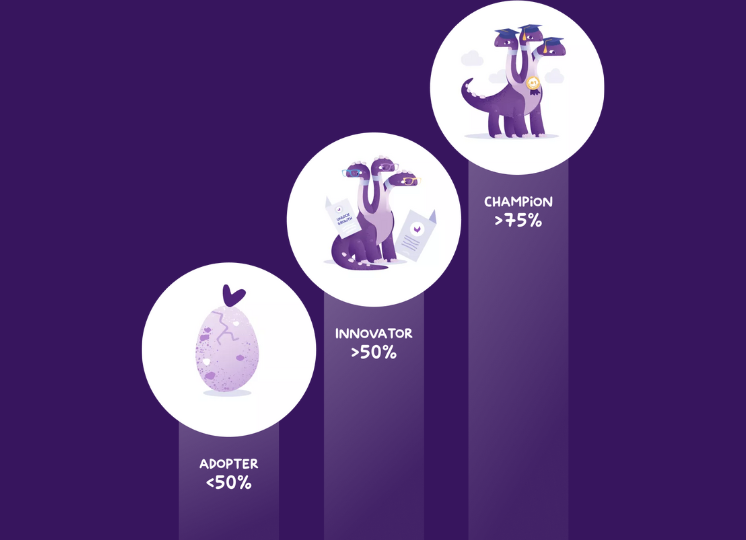
Use the PXM Maturity Model to scale the PIM Dream Team

To know where to start and define a clear PXM roadmap, it is important to have the PXM Maturity Model in mind:

PXM Adopter

A PXM Adopter establishes a single source of truth as a strong foundation for using product information consistently across channels and markets. This means your team is aware of the complexity of scaling, but are still dealing with outdated processes and a manual way of working (hello, dozens of Excel sheets, but goodbye!). 

PXM Innovator

A PXM Innovator starts to unlock growth with a collaborative model between teams and formalizes a process to make sure attributes and assets are defined to match the product experience that customers expect along the entire buying journey.

PXM Champion

A PXM Champion unlocks growth at scale thanks to a scalable and well-designed platform that involves internal and external stakeholders and aligns with the business strategy. Whenever you’d like to know more about where you are today, just take our free PXM Maturity Assessment, which will guide you through the People, the Process, and the Technology actions you should take as the next steps. 

Follow the Leaders

Forming your PIM Dream Team, identifying stakeholders, and earning their buy-in is a crucial step in the success of a PXM program. And the global vision, the “why we must achieve it”, must be shared very early with every stakeholder, even if they won’t all be involved simultaneously in the project. They will share and thus embodies this vision, knowing perfectly why this matters and what is at stake.  Here are the Fantastic Four that will make your project a success: 
  1. It is mandatory to get Executive Sponsorship – sponsors will be responsible for keeping the projects aligned with the organization’s strategy. They evangelize the PXM vision, own the business cases, focus on realization of benefits, and provide dedicated guidance, resources, and oversight.We consider their implication on the overall project from 5 to 10%. 
  2. Dedicate a (PXM) Project Manager or Product Owner – (s)he will be responsible for a myriad of things, including:
    • Planning, organizing, and directing the completion of the project 
    • Building and managing project plan 
    • Delegating team responsibilities, tracking day-to-day project action items, and escalating project risks or blockers when needed
    • Embodying the PXM visionAs nothing is better than listening to someone nailing it, here is a sneak peek from our annual summit Unlock, interviewing Royal Canin’s PXM Owner, Sylvain Cavaillé.We consider their implication on the overall project from 25 to 40%. 
  3. As  we introduced earlier, the PXM project is firstly a business project made for supporting business people to achieve business goals aligned with the company’s strategy. So, the Functional Administrator is the core of such a project. (S)he is the business owner of the applications and helps optimize and adopt a new way of working, the voice of business users.(S)he typically receives design input from a variety of other business users with product knowledge like Product and Brand Managers, Purchasing teams, Sales Channel Managers, Marketing, eCom, Marketplace, Media, etc.We consider her/his implication on the overall project from 50 to 100%, depending on the project scope.
  4. Last but not least, you always need a business-oriented  Technical Administrator who can manage and define the governance of the system architecture. They define and validate the architecture and integrations with other IT systems (e.g., ERP, PLM, E-commerce, DAM, etc.) and maintain integrations post-implementation. We consider their implication over time from 10 to 25%. 
Obviously, this list is not one-size-fits-all. Every organization is different, and you’ll likely have to adapt these practices based on the internal organization of your company, or whether your PIM tool is utilized for only one brand or multiple brands/subsidaries. But this should work as a great starting point for your team. Empowering teams with Akeneo PXM Studio is our mission, and we follow our customers closely on their path to PXM Maturity.  We have dedicated one of our annual awards to that topic. The Leadership Award category aims at rewarding organizations that have been able to grow with their teams.  You can discover this year’s winner’s history, Azelis, a 20 year old group that elaborates and markets specialty chemicals in animal nutrition, food & health, personal and home care, and pharma market segments.  I’m looking forward to hearing from new positions created in the PXM world! If you have any questions about building your own PIM Dream Team, our team of in-house PXM advisors is here and happy to help!

Virginie Blot, PXM Evangelist

Akeneo

The importance of offering value (not just products) to your customers

Product Experience

The importance of offering value (not just products) to your customers

To inspire and engage your customers, there is nothing more effective than offering services before (only) selling products. Everybody appreciates a personalized and insightful experience. In this article, discover five great examples from our customers at Akeneo, that offer value to their end customers and the preliminary work it requires on product information.

One of our customers (Head of CX in brand apparel) recently shared this statistic with me: 50% of customers come to your website because they already know what they want to purchase, and 50% of others come to get inspired.
Social media success (Instagram, Pinterest, and, more recently, Tik Tok) has set the path. Being inspired is now a must-have, and shoppers will be engaged with brands they share values and inspiration with. Engagement is the new loyalty. This is what TikTok marketing-based company Revolution Beauty Digital Director, Sally Minto, perfectly described in a recent conversation.

To inspire and engage your customers, there is nothing more effective than offering services before (only) selling products. Everybody appreciates a personalized and insightful experience. There is no better feeling than buying the right product(s) for your needs.

How can you offer value to your customers? Here are 5 great examples from our customers at Akeneo.

From the now classic Usage Finder… with a focus on education

To ease the product research process, you can offer the relevant filters on your website to make the search experience easier and the process more visually appealing.

Below is a great example from one of our customers, Made.com: when you buy a sofa or any piece of large furniture, the most important first step is to ensure that you find one that will fit into your room. The Sofasizer enables you to drag to the maximum size allowed by your space and instantaneously display only the relevant sofas.
You’ll be more willing to buy when you save time and are sure the products you’re browsing are the right size for your space.

AnAlternativeText

And if you need help on what to pay attention to when you buy a specific piece of furniture, Made.com has prepared some Guides for every important product category. They guide you with measurements and questions to ask before buying a product. Once you know what to look for, the brand suggests the most appropriate shopping list.

AnAlternativeText
AnAlternativeText

Educating your clients is one of the best ways to increase customer loyalty and retention. It gives them a feeling of being cared for and supports their informed decisions. Additionally, it allows you to stay up-to-date on the latest trends in your industry so you can offer them the best service possible.

It is even more true when it comes to the Cosmetics and Food Industries – people really want to be aware of what they eat and use for their skin.
Belco is a coffee sourcer that sells directly to coffee roasters and upholds sustainable, environmentally-friendly coffee culture, showcasing its extensive farming know-how and land identity.


Their enhanced filtering capabilities allow their B2B users to filter based on the aromatic family of the coffee you’re looking for (floral, fruity, malty, milky, roasty, spicy, etc.), certification or origin, and each matching coffee is introduced with the farmer, and producer who cultivates it. This transparent process helps customers learn about their coffee beans’ history and source, humanizing everyone in the process and making it easy for Belco to communicate and share their values with their shoppers.

AnAlternativeText
AnAlternativeText

To the Emotional Finders…

Whether you’re building a product recommendation quiz or a virtual consultation for consumers to find their right style or fit, quizzes help brands engage with their target audience in more meaningful ways.

Through a well thought-out series of questions, brands can improve their retargeting and personalization strategies to acquire new customers and keep every visitor returning for content and products relevant to their needs.

And remember, quizzes aren’t just fun for your customers; they help provide valuable information for brands, making the shopping experience at your eCommerce store, on your App, or in store, better for the customer—while increasing your sales.

Let’s start with the Beauty industry. Sephora offers a quiz to find the perfect product for the lips. From the type of lipstick finish to the benefits and the composition of the makeup to the kind of brand (“hot” vs “best sellers”), you’ll get a selection of products that match 100% with your desired product. This reconciles both the usage and the inspiration and is a near-guarantee to selling a product.

AnAlternativeText
AnAlternativeText

And the more expensive and important the product, the more customers will want to be sure of their investment.
Beds are a good example as you don’t change them every month. This quiz from a US-based company, Sleep Number, takes care of several people’s considerations (you and your partner) to suggest the best mattress.

AnAlternativeText
AnAlternativeText

And this is not relevant for human needs only! All pet owners want to offer the best for their loyal companions. This is why Royal Canin wants to ensure every pet gets the food he or she deserves.

AnAlternativeText
AnAlternativeText

The quiz delivers a personalized outcome to the user, making the entire shopping experience engaging and fruitful. You can then go on to link the recommended products to your website and complete the sales cycle.

Remember, the primary goal behind the best product recommendations should always be to provide the best value to the customers.

Ready to offer the best product experience to your customers?

Wait a minute! Even if that kind of service can look easy to deliver, this requires that every single product you sell has a high quality of product information so that every single piece of data can be used as a filter, a tag, a possible answer to a quiz question, and can then be displayed as a possible result.
And this is possible only when you get a mix of the right people involved, the right optimized processes, and the right dedicated tools to support your product experience strategy. A user-friendly PIM, like Akeneo PIM, empowers every stakeholder to collaborate around the product information to ensure that the (e)merchandising team can easily offer the best product experience thanks to accurate information enriched by the product or marketing teams.

Now you know how to delight the 50% of customers coming to get inspired!


Virginie Blot, PXM Evangelist

@Akeneo

AGU & Akeneo: Racing Towards the Finish Line

Product Experience

AGU & Akeneo: Racing Towards the Finish Line

With the 2022 Tour de France wrapped up and the 2023 race already in sight, it’s important to keep in mind all the people, processes, and technologies that are working behind the scenes to keep the wheels turning.

The Tour de France wrapped up last week, and it’s become more clear than ever before that competition is thriving and setting yourself up for success is a long process that starts at the beginning. But with the 2,000-mile race and the finish line in the rearview mirror, it’s a good time to reflect on the entire ecosystem of folks and organizations working behind the athletes to give them the right tools and equipment needed to win. One such organization is AGU, a Dutch company that has been making cycle clothing since 1966. With over 25,000 products in both B2B and B2C eCommerce, AGU is a global leader in the cycling industry with strong brand awareness, and has been involved with the Tour de France since the early 90’s. In fact, this year, they embarked on a joint initiative with Team Jumbo-Visma to unveil the Masterpiece Ride-Up Shop, a mobile shop driven by a bicycle through the center of Copenhagen, the starting point of the Tour de France.
But where AGU excels in cycling wear and expertise, they struggled with a problem known all too well by organizations across the industry; creating a truly omnichannel business experience for both their B2B and B2C customers. Expanding into new markets and territories was an arduous, manual process that simply wasn’t scalable. Without a central repository of product information, AGU had no way of knowing if their product data was complete, consistent, or correct, let alone compelling. Despite their years of expertise and knowledge in the cycling industry, some consumers (specifically B2B consumers) didn’t know whether they could trust the information they were seeing about any given product on any given channel, meaning they were more hesitant to purchase. A breakdown of trust between yourself and your customers is never what you want, so AGU set out to find a PIM solution that would help streamline their product information, regardless of the channel or region. With a focus on accelerating market launches in new territories, AGU wanted to enhance the product experience on their website and facilitate sales through new marketplaces in a scalable way. And just as the Tour de France cyclists turn to the experts to provide them with the right bikes, helmets, and clothing to win the race, AGU wanted to partner with experts in the PIM space to ensure they were implementing the best technology and process. Enter Akeneo. With enhanced processes in place to enrich more products,  launch new channels and markets more efficiently, and collaborate with both internal and external teams, AGU’s online business in markets outside of the Netherlands outperformed their online business in their home market. They were able to successful launch on several big-name online retailers such as Amazon and bol.com (biggest online retailer in the Netherlands). Plus, the Akeneo PIM interface is simple enough to use that no technical training is required; so no matter who joins the AGU team or what their background is, they’ll be able to jump right in. Perhaps most importantly, the customer experience for AGU consumers has vastly improved; with better attributes, more accurate data, improved filters, and up-to-date research on both the B2C and B2B sides, customers are no longer left guessing whether or not the product information they’re receiving is accurate and they’ve been able to restore that brand trust that they’ve held on to since 1966. Now a fully global company with locales across the world and a scalable process for adding new channels whenever they need to, AGU has been able to set themselves up for success regardless of where the future pedals them towards.  So with the 2022 Tour de France wrapped up and the 2023 race already in sight, it’s important to keep in mind all the people, processes, and technologies that are working behind the scenes to keep the wheels turning. AGU is able to continue equipping their cyclists with the best-in-class sportswear, with product information powered by Akeneo.