Expert Interview: PIM Market and Trends with Mark Smith, CEO of Ventana Research
In any business, creating and maintaining a great customer experience is critical to driving sales. One of the most influential components of that exp…
In any business, creating and maintaining a great customer experience is critical to driving sales. One of the most influential components of that experience is the presentation of product information. Evocative product descriptions, accurate product specifications, and compelling media all contribute to the customer experience and increase the chance of purchase.
However, developing and maintaining impactful product information can be a challenge. There’s a gap between supplier information and the final customer experience that must be bridged. The number of product SKUs and markets served keeps increasing for growing companies. What’s more, in an omnichannel world, those final customer experience platforms are becoming ever more varied and customized: online marketplaces, mobile, voice, print, and POS to name just a few.
Every channel has different requirements and global companies must use the correct pricing, size charts, measurements, and language in accordance with the region they are selling in. Customers are wary of purchasing products from sources that have inconsistent or incomplete product information.
For many organizations, implementing a PIM solution provides the functionality they need to improve their product information management, and in turn, their customer experience management.
For more details, check out this interview with Mark Smith from Ventana Research. Mark explains why organizations should invest in PIM solutions and talks about the current PIM market, trends, and future expectations.
Interview Transcript:
Hi I’m Mark Smith, the CEO and chief research officer at Ventana Research. And I specialize in many areas, but one of them being the product information management (PIM) market.
What is Ventana Research’s focus?
At Ventana research, we do a lot of market research that helps provide insights and best practices to help organizations drive better time to value and to make sure they pick the proper vendors to help them achieve their goals. So one of the things we accomplished this last year, was our benchmark research on product information management (PIM), which looked at the state of the PIM industry but also looked at the objectives and the opportunities organizations face in front of them. That provides really important insights where companies need to get rid of spreadsheets, they need to find dedicated tools, and trying to find better value from their overall products.
What are your current observations on the PIM market?
At Ventana research our views of the PIM market have basically been the same over the last decade. Businesses need to take control of their own destiny, manage their product processes, and have the right information to be able to support it. Part of those market trends include the need to not only better enable business professionals to manage the information but also work together as a collective team and share product information across the supply chain of their customers to their manufacturers in a much more efficient way than they ever have before.
What emerging trends do you see in Product Information Management (PIM)?
Some of the key emerging trends in the PIM market involve stepping back and thinking about, “how do we actually get more people to not only support the management of PIM product information but also how it is consumed ”. One of the key trends is around product experience and understanding what is the product experience that customers and consumers expect. But how easy is it to manage that information or to be able to share it, right? Customers expect to have beautiful information about the products that they are searching for or to potentially purchase. When I mean beautiful, those things might be video, they might be images, they might be ratings, there’s a whole collection of attributes that are really essential for product information management.
Is PIM a business imperative or simply a nice-to-have?
PIM has become not just an important business imperative but a required one. For product processes to run efficiently across organizations they need to be able to invest in products and the information that describes the products. In fact, the information is probably more valuable to a company than the product itself. Because we have to market it, we have to sell it, we have to service it. We have to be able to understand that PIM is a foundational piece to how companies actually operate both internally and externally. The business imperative is that PIM becomes the investment place for all participants to get access to product information. And that really is seven days a week, 24 hours a day for consumers or for the people who support it on a daily basis. This is how they collaborate and work together to have a better result.
How can companies justify investing in a PIM tool?
Building a business case for PIM involves stepping back and thinking about some of the practical dynamics of what companies are supposed to do. “How do we provide product information to our customers and consumers?” Typically, organizations will find issues they currently have with customer satisfaction, customer experience within their digital commerce systems, or their website doesn’t provide the right kind of product information that actually describes the product, so what do they do? They actually then go online and chat and call the call center. If you step back and think about that digital commerce, sales and marketing, contact centers, all those have access to and a need product information. If we want to be efficient in our organizations, we need to understand how to prioritize those requirements to drive a business case for making investments in PIM. If organizations do that, it’s a pretty simple equation. It’s a requirement to be effective in supporting the needs of the company and the value in the products and services that they actually provide to the marketplace.
PIM has traditionally been for B2C companies – is PIM relevant for B2B companies?
PIM is just as important to business to business (B2B) marketplaces and organizations as it is for B2C. Manufacturers have suppliers who have information about parts and that information that comes in to make a whole product or manufacturers need to share that product information to their distributors or end retailers. That whole B2B spectrum requires having a common set of business information around the products. Products are the centerpiece of the efficiency and the value equation in a B2B organization. And in fact, it’s actually a little bit more complicated with different organizations who have demands for varying interfaces in which they need to share information on a real-time basis comparatively to B2C where I’ve got to make sure I have the right information in my commerce system, those things can be actually much more easily automated compared to the core of what B2B’s mission is. Their mission is to be efficient, to drive the value from the supply chain all the way out to the demand chain of their retailers or customers.
What if I don’t have access to the product information I need?
For organizations that don’t have all the product information, they can start to establish a shareable product catalog. Establishing a product information network where information can be provided or supplemented by manufacturers or distributors and brought into a product information network, as we call it at Ventana Research, is a starting point to build a more robust set of PIM processes. Now augmenting information can sometimes be challenging without having the right kinds of technology because now we actually need to be able to enrich it from multiple parties, not just inside the enterprise but across the entire value chain.
Is PIM the same thing as MDM?
In the PIM market there are a set of different views on the marketplace. Is it master data management (MDM) where we manage the masters of our product data? Or is it on the PIM side as a business application? At Ventana, we take a business-centric approach. We look at PIM as an application that’s used by business professionals and as well as the extended customers and consumers that access that information. PIM has master data management built inside of it. Many organizations have other issues in regards to data and enterprise where they go to manage customers and products and employees and all those multi domain types of responsibilities. Now a company’s MDM infrastructure may or may not be useful to PIM but PIM can operate as a standalone environment because it’s focused on the business, the people who are actually held accountable for the product processes and the outcomes from them.
What’s the next big thing in PIM? Will AI and machine learning (ML) have a role?
The PIM software market is going through a pretty interesting transformation because it’s not just about the administration of the product data itself, but it’s about the usage of it, it’s about the consumption of it. How do we enrich that product experience? By using things like artificial intelligence and machine learning we can start to better understand our own product data. Looking at challenges and issues, we can automate the exception notification, we can prompt people, and we can also then drive further automation. If we know there’s a high confidence level that product information’s being enriched by particular sources or a network of certified sources, that actually can be brought together in a much more automated way.
We need to streamline the process around product information, and to do that AI and ML play a critical role. Just as ensuring that product information is up in the cloud, cloud computing and sharing information becomes easier. It all becomes much more streamlined when we have access to that information. And I think the other thing that comes from the both of those is that PIM is going to dramatically change over the next three years because customers and people in the enterprise are going to frankly want to ask about products, they’re going use their voice, they’re going use chat bots and voice bots. They’re going to want to actually get information delivered to them in the way that they actually understand it in the natural language that they hear and that they understand. It’s a pretty dramatic change where PIM will go and changes are already happening in other software segments as we started to use mobile devices, consumer devices to get access to information that we expect any time of day anywhere on the planet.
Has the PIM research conducted by Ventana revealed any interesting findings?
At Ventana Research, one of the interesting pieces of work that we did recently was the work to understand about how to build high quality and complete product information. One of the challenges that companies face in building complete product information is areas around product information quality and how do they have the opportunity to improve the outcomes of their product management processes. So this white paper help provide the insights and some opportunities to learn how to drive better results from their existing investments.
Want to learn more about the business values of PIM?
Turning PIM practices into the art of crafting compelling product experiences
“There is no good customer experience without a compelling product experience.”If you are an avid reader of this blog, have attended one of our co…
“There is no good customer experience without a compelling product experience.”
If you are an avid reader of this blog, have attended one of our conference sessions, or participated in our Akeneo PIM Summit, you have no doubt heard us say this before. We fundamentally believe that comprehensive product information and the ability to deliver a better product experience will become a critical component in retailer and eCommerce vendor strategies. Why? Because as brands and retailers compete hard for sales and market share, delivering a compelling product experience will become instrumental in increasing sales conversion rates and reducing product returns.
The proof behind this is in results reported by our customers:
4x increase in conversion rate,
40% reduction in returns, and
many who report significant gains in catalog management productivity.
Product Experience Management (PXM) is not just about accurate and comprehensive product data.
Akeneo PIM provides the foundation and the workbench for marketers and catalog managers to assemble and organize data from various sources. Today we announced an update to Akeneo PIM and a new Supplier Data Manager product. Together, this solution makes the product information management process simpler, more productive, and even more comprehensive. Now retailers and distributors can offer suppliers a secure, cloud-based PIM-like environment to provide product information from the most accurate source – the supplier! The combination of Akeneo PIM and Akeneo Onboarder will further streamline the process of getting accurate and comprehensive product data so retailers and distributors can, in turn, deliver it at the right time to the right place. With the time-savings and productivity this provides, marketing and eCommerce teams can now focus on creating an emotional connection with the buyer.
Consistency but no uniformity
Akeneo’s philosophy has always been to enable brands and retailers/distributors to drive consistency, but not necessarily uniformity. With our product experience management solution, you can build consistent product information but differentiate it based on sales channel, or locale. This contextual product information will be the future of PIM and the basis for PXM. Product experience management puts the customer at the center of every interaction and resulting transaction. As a result, the product experience you deliver significantly influences the customer experience.
A quote from our CEO Fred de Gombert sums up the importance of product experience management nicely:
As brands and retailers realize the power of personalized product experiences, PXM is going to emerge as a key category and practice and will add a new business dimension that was often overlooked in PIM. It makes product data even more strategic and helps marketers boost sales.
PXM can be a complex undertaking and its enablement will require purpose-built tools. We’ve got a lot more planned to enable our customers to make PXM a reality. We invite you to watch this space!
Catalog Management: The Right Tool for the Right Job
You wouldn’t use a Louis Vuitton stiletto to hammer a molly anchor into plaster with the hopes that it will hold that 200-pound mirror over the mant…
You wouldn’t use a Louis Vuitton stiletto to hammer a molly anchor into plaster with the hopes that it will hold that 200-pound mirror over the mantel, would you? Of course not. So why are you still using a simple spreadsheet program to handle the heavy lifting of catalog management?
Get out your power drill.
A Product Information Management system, or PIM for short, is the right tool for all your catalog management jobs. Update an entire product line? With the touch of a button. Need customizable access for your contributors? No problem. Translate products into German? Chinese? French? Bien sur! Export personalized assortment to multiple platforms? In the blink of an eye!
PIM is the powerful tool that addresses all your catalog management needs.
Catalog management software is the crucial tool for building capacity, which in turn fortifies growth and bolsters expansion into new locales. With the right PIM system, you control the pace of your business destiny.
How do we do it?
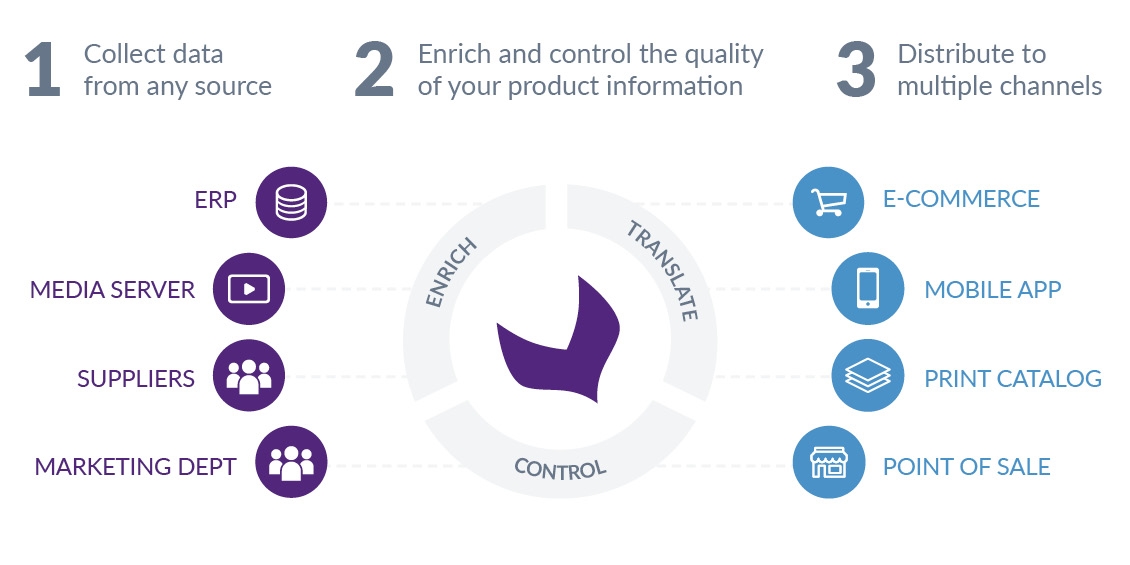
Akeneo PIM is your toolbox for the collection, enrichment, and distribution of product information.
Automatically collect or import data from whatever source you like. Akeneo provides the ability to integrate with virtually any data source such as ERPs, vendor portals, spreadsheets, and .csv files.
Enrich product descriptions with marketing details, technical data, and media files. Ensure that all product information is included before items are exported with our completeness widgets.
Distribute your products easily through a variety of sales channels (print, mobile applications, marketplaces, e-commerce website, etc.). You have complete control over every aspect, and transforming digital to print is as easy as the click of a button.
Total freedom in the way you want to market your products.
Advanced Rights Management: Akeneo PIM gives you complete control over the type of access for each user. Whether users are internal employees or external freelancers, you determine exactly what they can or cannot construct.
Approval Workflows: Maintaining editorial control over your content is a necessity. However, it would be a herculean task to enrich every product yourself. You can view, approve (or reject) and generally keep tabs on all that your contributors have appended with our super-easy workflow validation engine.
Teamwork Assistant: Speaking of tabs, Teamwork Assistantmakes it easy for teams to manage themselves. Tasks that need to be completed are displayed on an easy-to-use interface, personalized for every team member. Teamwork Assistant even helps keep your team on track by automatically generating reminders as deadlines approach.
Catalog management made easy.
So why Akeneo?
Easy to learn and use – with Akeneo PIM’s intuitive user interface, your team can spend less time training and more time doing.
Customization is not an issue – we understand that every project is as unique as our customers, so our solution is built to support all types of catalogs.
Streamlines workflows – from product introductions, updates, or even full production of printed publications, Akeneo PIM provides users multiple tools to make the entire process efficient, trackable, and complete. And with your next collection around the corner, you’ll be ready!
Connections made easy – we have worked with numerous technology partners to develop an ecosystem of extensions to simplify integration with the other tools and systems you are already using.
Open source makes for better business – the open nature of Akeneo encourages users to customize their PIM to fit the way they do business. As a result, there is a thriving community of integrators to help make that happen.
Spreadsheets are so yesterday – you want to grow and expand your business for today’s marketplace, so why use an outdated catalog management tool to help you achieve that blueprint?
The question isn’t why would you use Akeneo’s PIM software, but rather Why wouldn’t you?
Seasonal Sales: Using PIM to Prep for the Summer Sales
Summer seasonal sales play a key role in customer buying behavior. In fact, many customers wait for seasonal sales just so they can purchase items at …
Summer seasonal sales play a key role in customer buying behavior. In fact, many customers wait for seasonal sales just so they can purchase items at cheaper prices.
This presents a major opportunity for eCommerce companies to generate additional sales:
Better weather increases people’s spirits
Well-earned vacations often trigger buying
Summertime features a variety of celebrations that encourage gift giving and other shopping (graduations, weddings, prom, mother’s day, father’s day, etc.)
Increased outdoor activities trigger the purchase of many goods (camping gear, swimsuits, sports gear, summer camps)
What’s more, some vendors order new and cheaper products just to include in seasonal sales. When the season is over the changeover of collections (especially in fashion and apparel) encourages businesses to empty stock as much as possible before their fall/winter collections are released.
Seasonal sales events provide retailers and eCommerce organizations with a great opportunity to generate a lot of profit and empty out their stock.
This stock changeover occurs across the globe, requiring organizations to be agile in managing product information and promotions. If your product information infrastructure isn’t ready for this tidal wave, you could lose business. You need a tool that can support complete and accurate product information across all sales channels.
Managing Seasonal Sales with Product Information Management (PIM)
Having the ability to quickly prepare specific product offerings and provide the most relevant information is the largest challenge/goal of prepping for seasonal sales. However, this challenge can be overcome by using a robust product information management (PIM) solution. PIM helps omnichannel companies organize, enrich, and publish relevant product data across all of their sales channels.
How PIM Helps
PIM creates an always-up-to-date product information database that can house summer-specific media, descriptions, and other product information. This streamlines the data enrichment process and ensures that all of your products look great across all of your channels.
Simplify product selection: PIM makes it easy for product managers to select groups of products or add new products to the catalog for specific seasonal sales. Vendors can include certain products in these catalogs only for the time of the sale to create a limited-time catalog or product groupings.
Make it easy to add and modify emotional data: Since consumer buying behaviors are largely driven by instinct rather than true need, having product data that appeals to those emotions is critical to maximizing conversions. PIM makes it is easy to add specific seasonal attributes like summertime pictures, evocative product descriptions, etc. Plus, by using a dedicated product grid, you can update the information only for the selected products that are relevant to the seasonal sale and quickly switch out the information as the seasons transition.
Streamline workflows to get sales up and running: When it comes to seasonal sales, time is of the essence and organizations can’t afford to miss the seasonal window. A long enrichment process could doom your sale. PIM significantly increases productivity.
PIM makes it easy to manage and enrich specific product groupings for seasonal sales.
Example PIM Workflow
The best PIM solutions include tools that help streamline product enrichment. Here’s a sample product enrichment workflow that can be implemented using PIM:
Select products: Team members can easily select which products they want to enrich, update, or include in their summer sales using the intuitive product grid. Advanced search tools help streamline product selection by showing only the information needed.
Set up the project: Product managers can quickly set up enrichment projects with their teams using integrated project management tools. Managers can set due dates, while automated workflows keep all team members on track.
Bulk edit: Team members can quickly edit large product groupings with bulk editing. They can mass edit, editing several products at the same time for the same attribute values, or edit sequentially, editing several products in a row without returning to the product grid.
Verify product information completeness: The most robust PIM systems include completeness tools to make it clear to your team which products are completely enriched and which are still missing information. For specific seasonal projects to the system ensures completeness for specific attributes that can be defined for each product group in that project. These tools ensure that your products look great across all platforms and that your team members always know what to do next.
Publish: PIM makes it easy to publish complete product information across platforms, including the ability to publish different versions of product information based on specific locales or platform requirements. For example, you can publish summer pictures in the US and winter pictures in Australia at the same time. Or, you can choose to create channel specific promotions, like a web-exclusive sale, and publish product information only on that channel.
PIM Makes Managing Products for Seasonal Sales Easy Breezy
PIM is a productivity tool that makes managing your products for seasonal sales easy. It’s an automated solution for keeping all of your product information centralized, organized, and up to date. It makes it possible for you to seamlessly manage all of your last-minute sale changes and additions to the product catalog. Never again worry about copying and pasting product information from spreadsheets with the accompanying inevitable mistakes, missing information, and delays.
Prepare for seasonal sales with a PIM solution that accelerates time to market and increases productivity.
Of course, PIM is not just for summer sales. PIM gives you agility all year long whether you want to do a limited-edition collection or want to do a small specialty catalog for back-to-school. PIM makes seasonal and contextual sales easy all year long. Responding to customer moods and rapidly changing trends in a timely manner is critical.
Meet customer demand and boost sales with relevant product offerings all year long.
Ready to revolutionize how you handle product information and start boosting your seasonal sales or promotional events? Contact us for a guided tour.
The news dropped two weeks ago: Adobe snapped up Magento for the tidy sum of $1.68 billion.This was not really a surprise, as the California software …
This was not really a surprise, as the California software vendor had previously missed two great opportunities to add an eCommerce offering to its customer experience platform. First in 2013 by letting Hybris fall into the hands of SAP and then in 2016 with the acquisition of Demandware by Salesforce. Since Shopify was probably too mid-market for Adobe, there were only a few options left.
So, was this simply a default choice? A question of Adobe taking the last remaining eCommerce option available to it? And will there be problematic fallout from meshing Magento’s open source community with Adobe’s traditionally proprietary cloud offerings? Will this acquisition be a bad thing for the open source community in general?
On the contrary, I think this acquisition is a highly strategic move for Adobe and a fabulous opportunity for both the Magento community and open source in general. Here’s why:
This is not a repeat.
The long struggle following Magento’s acquisition by eBay in 2011 is still on everyone’s mind. In that ill-fated acquisition, Magento lost its founders (Yoav Kutner only a few months after the acquisition and Roy Rubin in 2014) and suffered from a near-total paralysis of development efforts. This deeply weakened the solution and, facing increasingly mature competition, Magento started to seriously lose its luster. It took an organizational reboot and a lot of energy from the new management team to revive the phoenix from its ashes after a late, but highly salutary, exit from eBay in 2015. However, I don’t believe that this history will be repeating itself at Adobe.
Open source software never dies.
First, we must remember the basics: even with the worst intentions in the world, one cannot kill an open source solution. Without going into the technical details of the various open source licenses, we must understand that we cannot backtrack in open source. The existing code cannot be deleted or blocked. This is the incredible strength of the model: as long as a community is involved in an open source project, it will continue to thrive and evolve. And the Magento community has never been stronger! Great efforts have been made over the last two years to provide a real place for community-driven development. Even if tomorrow Adobe decided to stop these efforts or try to stop any contribution whatsoever to the open source version of Magento, it is very likely that the community will quickly rebound and put in place an effective governance to continue to maintain and develop this product.
Open SaaS is the new SaaS.
The other issue that has many worried about this acquisition is the very strong cloud culture of Adobe. Some have too often treated open source and SaaS as if they were opposing and irreconcilable models. Open source was intrinsically linked to an “on-premise” and highly customizable deployment. This was contrasted with SaaS’s lack of infrastructure issues and faster updates that came at the expense of customizability.
And yet the reality is very different. The vast majority of open source publishers (Talend, SugarCRM, Nuxeo, MuleSoft, Akeneo…) have evolved their model by offering cloud solutions based on an open source engine and delivering the same services as a SaaS solution. All delivered without distorting the strengths of both models (openness and community on one hand, and the serenity offered by an end-to-end managed solution on the other). Magento is no exception to this new Open SaaS rule: they dove in a little over two years ago with the launch of Magento Cloud Edition.
Adobe will undoubtedly promote and invest primarily in this Cloud offering. This is Adobe’s strength and will probably allow them to go even further in the Open SaaS direction while creating better synergies with the other tools of their Adobe Experience Manager platform. But Abode will also continue to rely on the incredible ecosystem around Magento and the strength of its community. Why? Because, more than the functional depth of the solution or the technology behind it, this community is what makes, and will continue to make, the differentiating force of Magento.
The acquisition by eBay in 2011 was not driven by a strong product vision: it was mainly motivated by the opportunity to accelerate the adoption of PayPal as a means of payment on the very large Magento installed base. We are today in a completely different situation. Adobe is a software vendor that has repeatedly demonstrated an ability to anticipate the fundamental transformations of this industry and to constantly reinvent itself. A prominent example is the successful evolution of their Creative Suite of products like Photoshop and Illustrator to a subscription model.
It would be hard to believe that Adobe’s choice to buy an open source solution has been made without a very fine understanding of what makes Magento strong. And it is precisely the recognition of the value of this model at the crossroads of open source and SaaS that makes this acquisition a history-making moment for open source. This acquisition is therefore not a default choice, but a deliberate and informed strategic move that should tell us much about the future of software and proprietary solutions.
Just months after the spectacular acquisition of MuleSoft (another open source publisher) by Salesforce, this takeover of Magento by Abobe is another strong message for the software industry. The open source of 2018 is no longer relegated to low-level technologies such as databases or operating systems and is no longer (if it ever was) the antithesis of SaaS.
Open source is reinventing itself to bring to life the most demanding and attractive solutions in the market while preserving its fundamental values of openness and collaboration. A very nice victory for open source indeed.
The Short Answer:
MDM provides organizations with a single data source for all information. PIM centralizes just product data for marketing purposes….
The Short Answer:
MDM provides organizations with a single data source for all information. PIM centralizes just product data for marketing purposes. PIM is, therefore, a much easier and more useful implementation for marketing and sales teams while MDM is a much larger enterprise-wide deployment.
Slighter Longer Answer:
MDM(Master Data Management) is an IT-led initiative focused on creating a centralized “golden record” of master and reference data across many domains: customer, product, location, supplier, financial, etc. The objective is to create accurate and consistent information accessible to everyone across the organization.
PIM (product information management) is a subset of MDM that focuses on delivering high-quality and accurate product information and is most frequently used to support merchandising and marketing.
As a business-led solution rather than an IT-led initiative, PIM typically represents a much easier and more cost-effective implementation than a more ambitious and organization-wide MDM deployment.
More Details:
What is Master Data Management (MDM)?
Definition
MDM is a set of processes and tools used to deliver harmonized data to support smooth business operations across a variety of systems and applications. MDM enables organizations to collect, match, clean, aggregate, and distribute consistent and accurate master data to operational and analytical systems.
Purpose
MDM systems typically manage data across multiple data domains including employee, customer, financial, location, and vendor information. As a result, MDM projects tend to be very broad in scope and require significant resources to implement and maintain. The use cases for an MDM system can also span multiple business objectives and functional departments across an organization.
Benefits
MDM helps organizations improve business operations by:
Decreasing the complexity inherent in globalization and expansion
Reducing data inconsistencies that can have major impacts on business operations
Allowing organizations to make edits to data in one area and ensure that those edits are reflected in all appropriate areas
Providing cleaner data for analysis
Supporting consistent data across multiple platforms and tools
Helping meet compliance regulations
MDM helps organizations improve business operations by removing data inconsistencies that can have serious business impacts. However, it is a massive effort with inputs and impacts across the entire global organization.
What is a PIM (Product Information Management)?
Definition
PIM is a product-oriented software solution that allows organizations to centralize and enrich all of their product information to deliver accurate product descriptions and images in a globally scalable multi-channel marketing environment.
PIM provides a single source of truth for product data. It makes it easy to enrich products, manage images, and ensure they look great on any platform including websites, marketplaces, mobile, print catalogs, and retail points of sale.
PIM centralizes product information to provide a single source of truth within organizations.
Purpose
PIM is the best way to enrich product data and descriptions. It removes the tedious and repetitive tasks that are required when using spreadsheets to manage product information. PIM tools typically connect easily to eCommerce systems. PIM can be useful to marketers, catalog and eCommerce managers, as well as data governance drivers and buyers. Compared to MDM projects, PIM initiatives are faster to deploy, require fewer resources, and deliver business value much sooner.
PIM solutions provide three core capabilities :
Collect data: PIM can collect and centralize product data from numerous sources including databases, ERPs, flat files, media systems, and supplier portals. Data sources can be prioritized, and information can be cleaned to seamlessly integrate into catalogs.
Enrich data: Once product data is collected, marketing and eCommerce teams can enrich the data with customized product descriptions, specifications, classifications, usage data, translations, and media files. Organizations can also improve their data quality by having a clear picture of which products are “complete” – i.e. have all the necessary data required for publishing – and which ones still need to be enriched.
Publish data: With wholly enriched products, data can be distributed to all sales channels like eCommerce platforms, mobile applications, AI-enhanced tools like chatbots, social networks, and marketplaces. Plus, with the right solution, many PIM systems make it easy for eCommerce companies to quickly create beautiful print catalogs with just the click of a button.
Benefits
PIM helps organizations:
Improve product data quality and accuracy
Improve overall catalog and product information management processes
PIM allows organizations to easily maintain and enrich all product information so it can be utilized across sales channels.
MDM vs. PIM? Which is the right solution for you?
Both MDM and PIM solutions offer a similar set of capabilities and can be used to organize critical product data to provide companies with a single source of information. This centralized source of truth provides a stronger basis for making major business decisions and keeps everyone on the same page, but the question remains – which solution is right for you?
If your primary concern is increasing sales, adding additional product SKUs, or entering new channels or markets, then you want a PIM. It’s a dedicated, business-centric marketing solution that offers a much faster deployment and ROI compared to an enterprise-wide MDM system. PIM tools also tend to have robust connectors to eCommerce, print, mobile and POS systems as these are the main consumers of accurate product data for marketing and sales.
On the other hand, if your use case includes managing other data domains such as customer, financial, or location data, or treats product data as simply another domain, and you have sufficient resources and time for deployment, MDM may be more appropriate for your needs.
Want more information about the need for and benefits from a product information management system? Take our self-assessment today to see where you are on the path towards better product experiences: PXM Self-Assessment
Congratulations, you have a growing e-commerce business! Important numbers are up – visitors, sales – way to go!
But wait a second, other numbers seem to be going up as well… Website and cart abandonment? Customer complaints? Returns? And why are conversions declining? That’s not good… what’s going on here?
Perhaps its time to examine a common source of growing pains in the e-commerce business – one that is absolutely necessary, yet has vexed even the savviest of retailers, wholesalers, and distributors: product content.
It could be time to invest in a system to help you cope with all the complexity of product information. We call that a PIM, short for Product Information Management.
In this blog post, we’ll explore some common issues that may indicate a need for PIM. But, before we start, we should mention what PIM is, and what it isn’t.
PIM ≠ Software
First, PIM is not just software. When we talk about “Akeneo PIM” (or any competing product in the marketplace), it’s really shorthand for a PIM Solution. Product Information Management is much broader and includes policies, processes, documentation, reporting, and yes, technology, all of which combine to create a centralized product content ecosystem designed for speed, efficiency, scalability, and very importantly, the ability to serve its data to multiple downstream systems.
In short, PIM enables and simplifies multi-channel commerce.
Any company selling products has to deal with product content. Whether it’s collected from suppliers or produced internally, printed in a catalog or published online, content is a critical component of commerce.
Because adding products and categories is incremental, most online sellers don’t feel much pain when they start with a small product assortment. Dealing with content is easy at first, and that lulls team members into a false sense of security, leading to institutionalized bad habits (read: Excel). However, the problems become evident when they try to scale up or to execute any large-scale data migration or re-platforming.
We typically view product information as anything a customer can see and interact within a digital channel – images, videos, descriptions, attributes, features and benefits, PDFs, etc. Upstream from the digital sales channel, these content elements are associated with productmaster data – the information we need to buy and sell that product, including brand, UPC, SKU number, category assignments, supplier information, etc.
It’s important to note that, in the world of enterprise software, all things are possible when it comes to data management. At Sitation, we have worked with clients trying to cobble 14 legacy systems together with duct tape and super glue to support their digital channels, others who have gone to extraordinary lengths to build their own modern systems from the ground up, and everything in between. Big companies have big systems, and there is no one-size-fits-all when it comes to PIM. PIM solutions are specialized, but also should be highly flexible and configurable in order to meet a company’s unique requirements.
Please keep in mind your organization’s systems and processes as we talk about 3 big issues that suggest it’s time to invest in PIM.
Issue #1: Data Management Causes Headaches
Selling in a traditional retail or B2B environment means that product information must be acquired, manipulated, and stored for publishing downstream. Most frequently, this requires processes to collect at least basic product information from suppliers, to manipulate it into a format suitable for review, and then pushing it to sales channels for publication.
Probably the most obvious internal sign that you need a PIM is that these processes represent growing costs inside your organization.
Product information management costs become apparent as sellers realize that these product assets are all over the place, causing chaos and inefficiency. Merchants, salespeople, and the marketing team each have their own repositories of product content, including the latest model numbers, descriptions, images, etc., and there is little to no coordination among them to reconcile whose is correct.
A lack of rigorous data governance policies contributes to these headaches. Who is responsible for what step in vendor and product onboarding? Who can change it? How do we know what has been updated? Where are the bottlenecks in the process? Why can’t management get clear visibility into the vendor and product onboarding pipeline?
Adding fuel to the fire, these issues are exacerbated with distributed teams, third-party content providers, and the constant push to add new categories, new products, and new channels, all of which is standard practice in a growing digital organization.
So, what is the underlying theme of these headaches? There is no single source of truth. That is to say, there is no system which contains the latest, most comprehensive, and most accurate version of product information and assets which can confidently be published and distributed to sales channels.
Issue #2: Lack of Agility and Long Lead Times
The immediate consequence of lax data management processes is systemic inefficiency when the use of your product data is required for a particular purpose, such as entering a new channel.
Behold this simple example:
ABC Company and XYZ Company both want to start selling on Amazon, which requires a custom data feed containing brand, model number, product title, images, taxonomy, etc. Both companies are growing, making money, sell similar assortments, and have a similar number of SKUs.
But, ABC Company, which fancies itself scrappy and frugal, is using its own ad-hoc manual processes for product data management, relying heavily on a few key people internally who have built their own individual Excel-based processes to collect and manipulate product information.
XYZ Company, on the other hand, has invested in PIM, and has rigorous controls around the collection, enrichment, storage, and publication of product data.
How do things look for these two companies when it comes time to create data feeds for Amazon?
ABC Company
Jan from e-commerce and her co-workers manage product info using ad-hoc processes, including email and spreadsheets and do their best to get the content into the ERP and/or e-commerce platform.
Jan requests a full export of product data from Bill in IT. Eventually, Bill gets to it.
Jan reviews data requirements for Amazon and manually manipulates column names
Jan manually updates content that doesn’t meet Amazon requirements, getting help from her team or a third party, if needed
Jan filters out products and categories that aren’t relevant to the channel
Jan passes the file back to IT to validate the data feed and manually fix errors
Publish
Need an updated file? Repeat the whole process.
XYZ Company
Susan and her co-workers manage product info by logging into a centralized, organized PIM system.
Susan creates a new data export process specific to Amazon.com requirements
Susan validates the data feed and addresses errors in the export profile
Publish
Need an updated file? Publish again, or create a scheduled publishing process.
This hypothetical is meant to illustrate an important point. As your catalog grows, content can become unwieldy, and at some point, a reliance on manual manipulation of product data using ad hoc manual processes becomes a liability to your company. Not only are such processes slow and inefficient, but the lack of documented, trainable, and repeatable data management processes exposes your company to a huge risk if key people leave.
Issue #3: Bad Customer Experiences in Online Channels
Some companies might consider all the above risks tolerable if the end result were the same. That is, they believe the content published to their digital sales channels through ugly ad hoc processes is just as good as that produced by an organization who has invested in PIM.
And they would be wrong. The reason is straightforward: PIM enables a superior customer experience.
Consider the following examples:
Consistency in Product Data
Well-defined category requirements afford the ability to see which products need additional enrichment to meet a minimal quality and completeness standard. When all items in a given category are enriched to 100%, a customer can confidently browse the category with a consistent experience, seeing images, descriptions, and attributes that are needed to make a purchase decision.
Parametric Filters and Product Comparisons
Consistency also means that customers using parametric filters on your websites get accurate results. How many times have you seen the same attribute value represented in several different ways? One inch, 1 inch, 1in. and 1” are all the same value, but your platform doesn’t know that unless you enforce data types and units of measure, a core capability of PIM systems (and a great example of how Excel alone falls short). Effective side-by-side product comparisons are similarly reliant upon clean, normalized data.
Time to Market
In most businesses, the ability to quickly respond to market demand is a critical component of e-commerce success. Customers want the latest products, the newest categories, and the most timely promotions. PIM helps to streamline product data processes, meaning your product is made available for sale sooner.
Nimble Categories
Different customers have different needs, and a smart seller will find multiple ways to merchandise the same product. Consider an office furniture seller who may sell desks, chairs, and filing cabinets. Products will be categorized into their primary category (e.g. “Desks”), but may also be shopped by collection, brand, or style, each being its own category in the taxonomy. Sitation’s clients who implement alternate taxonomies see significant boosts in sales, but supporting the process adds complexity which is best managed in a centralized system.
Upsells, Cross-Sells, and Bundles
Product to product, product to category, and category to category relationships enable intuitive shopping experiences that can increase average order value (AOV) and lifetime value of the customer (LTVC). These associations should be systematized in the PIM for maximal effectiveness.
Site Search
Sellers using Endeca, Solr, or other site search engines simply must have great data, or the site search experience will be cumbersome and unhelpful. Among Sitation’s clients, we note that customers who interact with site search convert at 400% higher rates than those who do not. Feed your search clean, normalized data from your PIM and watch the sales climb!
Foreign Language Translations
A simple, practical, and efficient method to create and manage foreign language translations of product information is essential when expanding to international markets. PIM can facilitate this process by providing clean workflows to create, review, and publish your foreign language content.
Caveat Emptor: A PIM System is Not a Silver Bullet
I’ll close this discussion with a reminder of where we started – PIM is not just software. Therefore, companies buying a PIM system should not expect to enjoy all the benefits of PIM without putting in the work necessary to leverage its key features.
Without the rigorous policies and controls around product information, the PIM system will simply become an expensive new home for the same bad data.
Instead, companies preparing for the integration of PIM into their e-commerce stack should follow an implementation roadmap that serves both business and IT. At the very minimum, the roadmap should include a runway for the following key activities:
Are taxonomies (including a “master” taxonomy containing brands and/or product groups and any downstream catalogs) reviewed, mapped and optimized?
What content quality requirements will be enforced at go-live for different channels? How are these requirements communicated to merchants, suppliers, and third-party content partners?
Will suppliers or other third parties require access to the PIM? How will they add new products, and update existing SKUs?
What reports and KPIs will govern product content processes? How do we measure success?
Only when these questions have been adequately answered, and the implications of the answers effectively integrated into the implementation plan, will a company have the best chance of fully leveraging the capabilities of PIM to address all three of the major pain points identified above: Data Governance, Agility, and Customer Experience.
With PIM running like a well-oiled machine, the enterprise is rewarded with efficiency and scalability in delivering content to downstream channels dependent on clean product information and is free to focus its attention on optimizing the user experience to grow sales and profitability.
ABOUT THE AUTHOR
Steve Engelbrecht is the President of Sitation, an e-commerce consulting group serving retailers, B2B wholesalers and distributors, and brands.
Headquartered outside Raleigh, NC, Sitation serves dozens of leading mid-market, national, and multi-national clients, providing expertise in taxonomy, product content, site search and SEO to improve online sales and profitability.
Learn more about Sitation at sitation.com.
Over the past few years, demand for Software-as-a-service (SaaS) versions of business applications such as CRMs and ERPs have increased dramatically.
…
Over the past few years, demand for Software-as-a-service (SaaS) versions of business applications such as CRMs and ERPs have increased dramatically.
So what does that mean for Product Information Management (PIM)? How can users benefit from using a SaaS PIM solution versus an on-premise solution?
Why would you want your PIM in the Cloud?
Akeneo’s SaaS PIM is a secure, low-risk solution to handling your product information, even for very large or complicated catalogs.
Akeneo’s SaaS PIM solution provides your organization with numerous advantages:
Focus on enhancing product information
Spend resources managing your product information, not maintaining hardware and software.
Marketers can focus on business needs, and not worry about developer resource constraints.
Access to the source code base enables custom development as well as visibility into code quality, robustness, security, and scalability.
Quickly connect to your existing infrastructure with a comprehensive web API.
Akeneo Marketplace Extensions make common customizations and integrations quick and painless.
Flexibility and control
Cloud installation and deployment saves effort and resources.
Deployed in nearest network data center for optimum performance.
Option to control upgrades and patch deployments.
Security and scalability
24x7x365 availability and monitoring.
Cloud infrastructure provided by Google.
Encrypted backups maintained by Akeneo.
Stop worrying about your technical infrastructure with Akeneo Cloud Edition.
Akeneo Cloud Edition: One PIM Served Two Ways
Based on different needs for different requirements, we created two deployments to deliver a Cloud PIM solution to meet your needs.
Flexibility mode is a platform-as-a-service model and gives organizations total control over the software including the ability to customize it. In contrast, Serenity mode provides a more classic SaaS experience with all of the infrastructure and maintenance issues taken care of automatically in the background.
Flexibility Mode: Platform-as-a-Service (PaaS)
This fully customizable cloud mode provides you with all the flexibility and features of Akeneo Enterprise Edition. The only real difference is that Akeneo PIM is hosted on our servers rather than your own. Your team still has full control over when to install patches and updates, as well as the ability to customize the PIM and use the API, so you can adapt the solution to your needs without dealing with infrastructure maintenance.
Flexibility mode provides full access to Akeneo’s source code. This means that your team still has the same endless customization options you’d have on-premise — including creating your own connectors or utilizing the full range of connectors available in the Marketplace.
Get advanced customization options with Akeneo Cloud Edition: Flexibility Mode.
Serenity Mode: Software-as-a-Service (SaaS)
Serenity mode provides you with all of the Akeneo Enterprise features as well as access to the API, but without the advanced customization capabilities. This is perfect for organizations who don’t need deeply customized code.
Serenity mode is fully automated, meaning you don’t have to worry about scheduling upgrades or patches; you’ll get them all automatically. Plus, just like Flexibility Mode, you have access to the full Akeneo PIM ecosystem of trusted Marketplace extensions.
Get updates automatically with Akeneo Cloud Edition: Serenity Mode.
SaaS PIM: Let Akeneo Take Care of It
With Akeneo’s cloud PIM offerings, you get all the benefits of Akeneo PIM Enterprise Edition without the headache of maintaining a complicated technology infrastructure. Whether you want the ability to fully customize our PIM using Flexibility mode or want the ease-of-mind of Serenity mode, we have the optimal solution for you.
Interested in seeing Akeneo Cloud Edition in action? Contact us today for a guided tour of our open-source cloud PIM.
PIM Integrations for Simplified Product Information Management Across Channels
If you sell or distribute products across multiple channels, you may find it difficult to keep your product and catalog data consistent across all the…
If you sell or distribute products across multiple channels, you may find it difficult to keep your product and catalog data consistent across all the apps and channels you use. That’s why many eCommerce organizations use product information management (PIM) to manage their entire product catalog (see our webpage What is a PIM?). The strength of a PIM system is only as good as the data that is put into it, and therefore your success depends on the strength and quality of your PIM integrations into your IT landscape—they are the key to keeping product information consistent across all channels.
PIM Integrations
Akeneo PIM is the leading open source product information management solution available on the market. Our open source approach, combined with a vibrant ecosystem of partners, makes it easy to integrate our solution with a range of other applications like ERPs, eCommerce storefronts, print catalogs, and online marketplaces using off-the-shelf or custom connectors.
Our extensive ecosystem of integrations allows our customers to focus on their eCommerce business, rather than dealing with complicated technology.
Here is a list of our most popular PIM Integrations with third-parties.
Google Shopping
This extension exports your Akeneo data into Google Shopping and allows you to map your shopping attributes to match those used in Google Shopping so your system continues to run without interruption. If the export process finds an unmapped attribute, it flags the entry for review but continues processing the rest of the files to minimize the impact on your eCommerce operations.
Quickly and easily present your products on Google Shopping channels.
Icecat Connector
Icecat is the world’s largest open catalog with more than four million High Tech products and more than 15,000 brands. You can import the Icecat data to enrich your existing product data, including attributes such as marketing text, images, multimedia assets, PDFs, and energy labels in up to 47 different languages. Simply map the Akeneo attributes to the Icecat taxonomy and you’re ready to go.
Mirakl is an online multi-vendor marketplace platform that can help you launch your eCommerce marketplace without a lot of time or hassle. In addition to its robust, modern technology platform, Mirakl also has a team of experienced consultants who can help you implement a combined Akeneo/Mirakl marketplace solution. Many configurations can be used depending on your business context and stakes as this connector can both pull and push data.
Accelerate your project initiatives and continue expanding your business with the Mirakl extension.
PIM2CATALOGis a marketing services tool to accelerate the conception of print catalogs. By directly connecting to Akeneo, you can quickly send your information into Adobe InDesign and easily create beautiful catalogs. You can be confident that the data is consistent and up-to-date between your online data and your print catalog since the data is taken directly from your Akeneo PIM records.
Create beautiful catalogs, datasheets, advertisements and more.
Plus, you can use PIM2CATALOG for more than just print catalogs—think product data sheets, price lists and advertisements. By eliminating the painful and time-consuming process of manually creating design assets, PIM2CATALOG saves you time and money while helping your product information reach the market quickly.
PIM to Translation.com aka “Akeneo2GlobalLink”
Akeneo2GlobalLink is the streamlined translation extension created in conjunction with our solution partner StrikeTru that allows you to connect Akeneo PIM directly to Translations.com. In one streamlined process, you can send product information from Akeneo PIM to translations.com for translation. You can even request information to be translated into multiple languages in a single workflow process. These localizations are then automatically uploaded into the PIM system once completed. This extension ensures that you can continue to scale your business and localize product information for many global destinations.
Use Translations.com to translate product information and have it directly update Akeneo PIM.
PIM to Magento 1 aka “PIMGento 1”
PIMGento 1 is a Magento plugin that reads data from your Akeneo system and sends the data directly to Magento data files. It uses CSV file formats to move data, including categories, families, attributes, options, products, product positions by category and images, and inventory balances.
Easily integrate your Akeneo PIM data with your Magento data files using the PIMGento1 plugin.
You can set PIMGento 1 to run automatically or manually without any deep customization or integration requirements that might slow you down. It runs up to 10 times faster than Magento’s native import/export routines.
PIM to Magento 2 aka “Akeneo Connector for Magento 2”
Together with Agence Dn’D, Akeneo worked on an official Connector to spread Akeneo catalogs to Magento 2 webstores. This SaaS-compliant, API-driven, integration will help merchants to accelerate their growth and time-to-market in just a few steps. Download the Akeneo Connector for Magento 2.
Import Magento 2 data without disturbing the structure of your eCommerce site.
Productsup
Productsup is a leading cloud-based solution for product data management. Use it to import product data from multiple sources, analyze and optimize it, and distribute custom feeds to unlimited destinations – quickly and easily. eCommerce sites can streamline their processes by optimizing the collection, import, distribution, and structure of product information across an unlimited number of channels. The increased control over the company’s product information helps ensure consistency across channels, which reduces returns and unhappy customers while maximizing revenue and profit. Productsup also simplifies the entire process of product information management across multiple channels.
Import product data and distribute custom feeds to unlimited sources and destinations.
Tessa
Tessa is a Digital Asset Management (DAM) system. With the Tessa DAM you can streamline your media processing with tailored workflows and deep collaboration capabilities. Once this integration is opened, users have access to all Tessa functionality and can execute full text searches, search on tags, metadata, or categories, and can assign attributes to assets. Tessa also includes a drag and drop upload functionality for product information, and offers security features that can be specified by user or role.
A DAM is the PIM for processing your media and is fully complementary with the Akeneo Enterprise Edition feature: the Product Asset Manager
Textmaster
Unlike some translation tools that either only use machine translation or rely solely on human translators, Textmaster has a network of qualified human translators and a machine learning component to automatically translate the previously approved text. This hybrid system provides human quality with machine speed and efficiency. The Textmaster/Akeneo integration allows for all translation workflows to happen directly within the Akeneo PIM, making it easy for you to expand your business into new locales.
Textmaster utilizes hybrid translation by humans and machines to ensure your translations are accurate.
Download this practical guide “From Overwhelming to Organized: Scaling Global Product Management” to learn more.
If your company is engaged in eCommerce—and what company isn’t in today’s economy —then you need a product information management solution to ensure consistency and accuracy of your product information across all channels. Relying on spreadsheets for managing data is a time-consuming and an error-prone waste of resources when you could be working with a world-class open-source PIM solution to manage all your product data in a centralized location.
Keep in mind that PIM is most effective when fully customized and integrated into your existing tools and workflow. Akeneo helps organizations achieve this both through a wide variety of off-the-shelf integrations, connectors, and customizations and by providing an open source ecosystem full of local and technical partners.
To learn more about the Akeneo PIM solution, contact us or visit our online marketplace of PIM integrations and extensions to see the selection of industry leading solution integrations we offer.
Welcome Vaimo! Meet Akeneo’s newest solution partner in Northern Europe
Akeneo is excited to welcome Vaimo to the Akeneo solution partner program. Vaimo is a major commerce solution provider headquartered in Stockholm, Swe…
Akeneo is excited to welcome Vaimo to the Akeneo solution partner program. Vaimo is a major commerce solution provider headquartered in Stockholm, Sweden, and represents our continued expansion and investment in the Nordics and UK. Vaimo joins an established ecosystem of more than 70 Akeneo partners worldwide and will help deliver successful implementations of Akeneo PIM in Northern Europe.
A Dedicated PIM Business Unit
Recognizing the importance of PIM in supporting multi-channel digital solutions, Vaimo acquired Notitium in September, 2017, a partner of Akeneo with strong competency implementing solutions to manage product information. The acquisition, along with this new Akeneo/Vaimo partnership, has formed the foundation of Vaimo’s dedicated PIM business unit which allows Vaimo to offer a complete commerce solution to e-merchants that includes both the e-commerce platform and a PIM solution.
“Akeneo PIM fits very well in the commerce solutions we provide. Akeneo’s similarities with Magento, both technical and functional, creates efficiency regarding integrations and cost of ownership.” — Magnus Bengtsson, Head of PIM department, Vaimo
An Open Source Leader Delivers Akeneo in Scandinavia
Vaimo has always been focused on and deeply committed to the open source community and earned their status as a Global Elite Magento solution partner. Vaimo delivers Akeneo as their open source PIM solution, which is already tightly integrated with Magento.
Who is Vaimo?
Founded in 2008, Vaimo is the global leader in delivering award-winning digital storefronts, omni-channel solutions and mobile apps. Their only focus is to accelerate B2B and B2C sales for their brand, retail and manufacturer clients.
With 15 global offices across EMEA and APAC and over 300 employees, Vaimo provides an international presence that allows them to cultivate close, long-term relationships with their clients. With a focus on driving digital innovation their services cover the full-spectrum of a client’s commerce needs ranging from strategy, design, development, optimization, and cloud services. They deliver solutions around B2B, B2C, Omni-Channel, PIM, Order Management and Business Intelligence.
Every year, Vaimo wins awards in recognition of their commitment to technical excellence, innovation and satisfaction. Among others, they have received the Gazelle Award (6 consecutive years), listed as Econsultancy’s Top 100 digital agencies (2 consecutive years) and Magento has recognized Vaimo’s leadership by selecting them as Global Elite Partner in 2017, Commercial Partner of the Year in EMEA in 2017, Omni-channel Partner of the Year in 2016 and EMEA Partner of the Year in 2015.
 Summer Release