Should you be automating your product information?
To answer this, just ask yourself one simple question: Do I repetitively cut and paste into documents or upload spreadsheets on a regular basis when updating or enriching product information? If your answer is “yes,” then you
could save time by automating at least some parts of your product information process.
How to automate product information:
Step 1: Ditch your spreadsheets. Use a Product Information Manager instead.
Spreadsheets are wonderful general-purpose tools that are good for a great many things. However, keeping your product catalogs up to date with the latest product information is
not one of them.
Still attached to Excel? Check out this blog post on
why spreadsheets suck for e-commerce catalog management.
So, please, ditch your collection of spreadsheets for a purpose-built tool: a product information management (PIM) solution. Excel just wasn’t built for managing product information in an efficient manner. There’s also no good way to automate your processes and stop cutting and pasting if you can’t let go of spreadsheets as your primary tool.
Step 2: Connect your data sources
A key feature of any good PIM is its ability to connect to: your ERP, suppliers’ data sources, media servers, custom internal data sources, and, yes, even to import the various spreadsheets that get sent your way.
Work with your IT team to integrate each of these sources with your PIM. Depending on what you’re integrating, and the PIM solution you’ve chosen, this may be plug-and-play, or it may be more challenging.
If your IT department doesn’t have the resources available, consider working with a specialized integrator. For instance, Akeneo integrators can quickly get virtually any configuration of inputs and outputs working with Akeneo.
Does reading the words “work with your IT team” give you a headache? Consider working with a PIM implementation team.
Once the basic plumbing is done, figure out how often each of these sources needs to be updated and work with your IT team to have your PIM suck the updated information in, on a regular basis.
This integration effort represents a not-inconsequential investment in resources, but the payoff is tremendous. You’ll never cut and paste again. And your time spent with Excel and CSV files will be limited to uploading them into your PIM (and this can generally be automated as well).
Step 3: Enrich and update your product information
As a catalog, product, or ecommerce manager, this is what your team should be focused on. And, now, thanks to magic of automation, you can:
- Keep products’ information up to date.
- Show colors, sizes, and specs.
- Enrich product file with photos, videos, and other media.
- Customize the information of your products per channel or country
And this can all be done without cutting and pasting. Automation will make your work here more productive as well.
Define rules to classify new products automatically
With clearly defined product categories, you can set up automation rules to classify your products into the right categories and easily enrich product information by adding values directly to the product.
Carry over product information across related SKUs
For instance, you can define a product structure that will allow you to manage common information without having to touch each SKU. So, for instance, every size and color of a specific T-shirt will carry identical product information EXCEPT for those fields that should change.
You can set up similar automation rules across language descriptions (for instance, automatically bringing across specs that don’t change across languages), while ensuring that your English language product descriptions don’t accidentally Deutsch sprechen.
Setup Editor/Publisher Workflow
Let’s face it. Not everything can be automated. There’s still a lot of grunt-work involved in keeping your product catalog as current and compelling as possible. Therefore, it’s useful to be able to parcel out and delegate mundane or specialized tasks across teams. But someone still needs to provide final approvals before publishing. That’s where automated workflow can make your job a
lot easier. Here’s how it works:
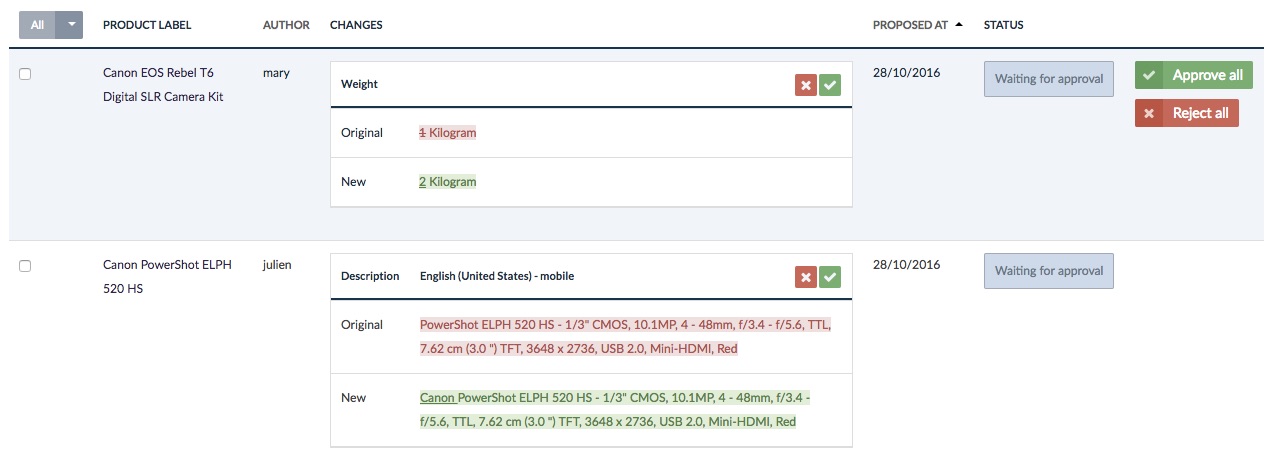
Delegate a task such as translation, product description enrichment, uploading photos or videos, or other specific tasks. This can be outsourced to a separate firm, freelance workers, or just down the hall. The specialized teams will make their changes in a draft environment and automatically notify you when the updates are ready for approval. You (or another manager with publishing permissions) review their work and indicate any changes needed, or mark it as ready for production once you are satisfied.
Step 4: Automate quality control
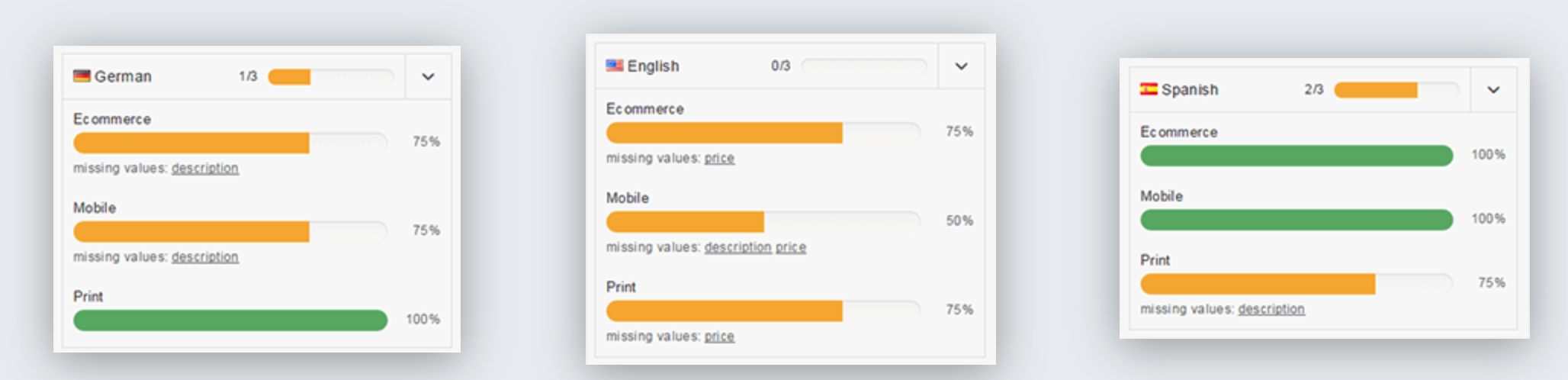
One of the great things about a good PIM is that it can automatically detect if every required field in every product record has been filled out, which prevents incomplete records from being published. No more uploading incomplete product information!
Step 5: Automatically publish different versions for different channels, platforms, and locations
Of course, the whole point of managing your product information is to give your prospective customers the most complete, accurate, and compelling product information possible – no matter where they are looking.
That means pushing slightly different product information for different channels, platforms, and geographies. Without automation, every new outlet, platform, or location becomes a huge pain point and often results in wasted time, versioning problems, and
huge headaches.
However, with a little work, you can set up your PIM to automatically export different versions for the various consumers of your products’ information that automatically take into consideration differences in:
-
- Languages
- Measurements
- Formats, descriptions and media for different channels like ecommerce, print, and point of sale
Akeneo has easy-to-use connectors for Magento, Prestashop, Mirakl, Shopware, print catalogs, and more.
In addition to exporting to different store fronts and ecommerce platforms through connectors and plug-ins, Akeneo includes an export builder that allows you to create reports showing the status of all of your product information. Create tailored reports for suppliers, translators, and purchase teams.
Much like setting up your import integration, you may need some help from your IT or an outside consultant in setting up a complex export configuration.
Step 6: Focus on your real job
The best part of automation is that it allows you and your team to focus on your real job: effective merchandizing to increase sales.
Convinced that you need a PIM?
Take a tour of the Akeneo PIM to get a visceral sense of some of the possibilities of automation for your organization. Remember, Akeneo is open source, so it’s free to get started.
 Summer Release







 Are you an e-commerce merchant that is trapped in a spreadsheet nightmare? Do you struggle to maintain product information and present products across different platforms? Does it take you weeks or months to update your system only to have to update it again the second you are finished? Most importantly, are all of these annoying tasks taking you away from your other job duties?
Have no fear, utilizing product information management software (PIM) can significantly simplify your life.
Are you an e-commerce merchant that is trapped in a spreadsheet nightmare? Do you struggle to maintain product information and present products across different platforms? Does it take you weeks or months to update your system only to have to update it again the second you are finished? Most importantly, are all of these annoying tasks taking you away from your other job duties?
Have no fear, utilizing product information management software (PIM) can significantly simplify your life.